Tis the Season Retro Halloween Mickey Pumpkin and Ghost Cut File for Shirts, Mugs and
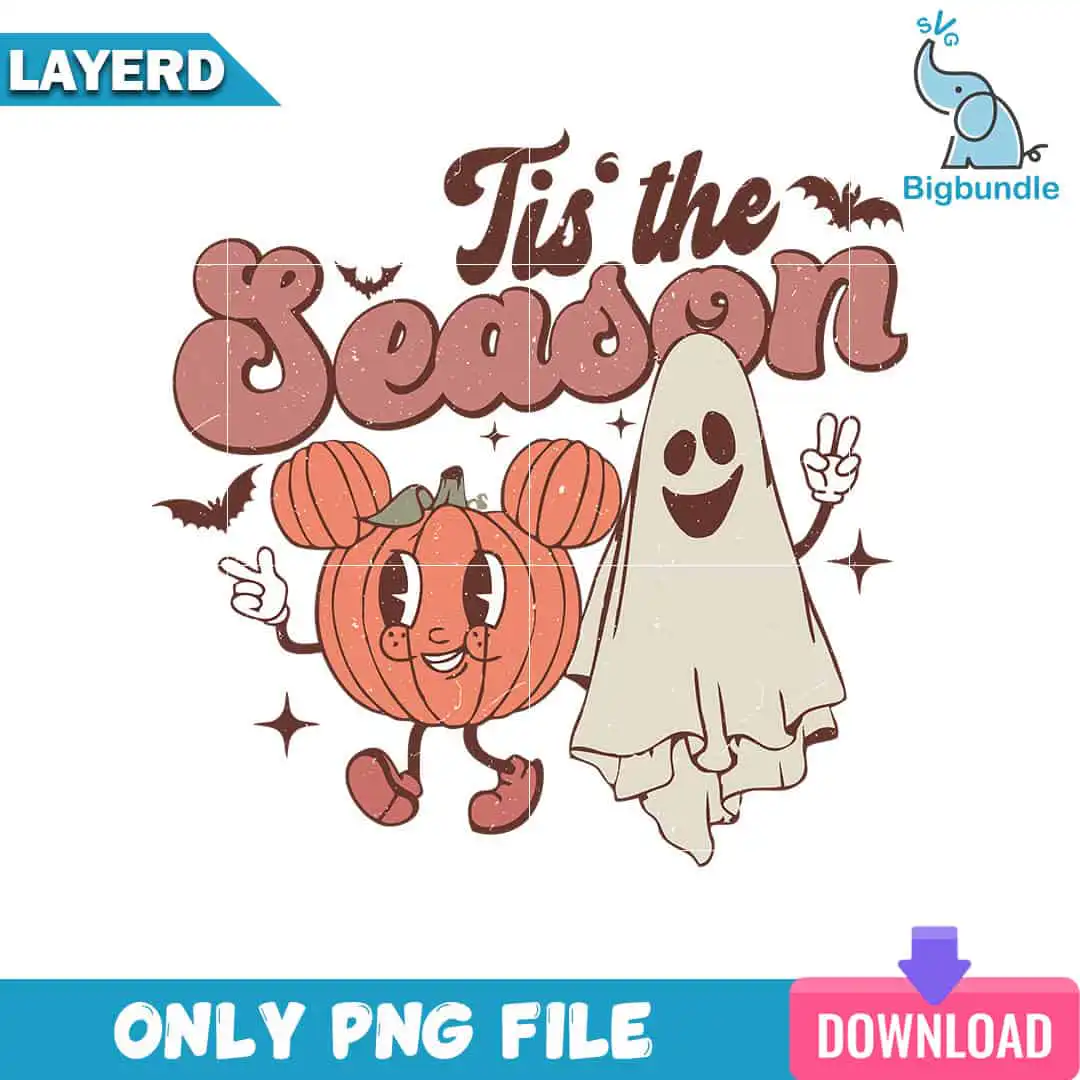
This Tis the Season design is a single retro Halloween scene: a pumpkin with Mickey-style ears and a smiling ghost giving a peace sign, set under the lettering “Tis’ the Season.” You get SVG, PNG (300 dpi, transparent), DXF, EPS and PDF files, made for shirts, sweatshirts, tote bags, mugs, stickers, sublimation and vinyl decals. The artwork uses terracotta orange, dusty rose, dark brown, cream and olive green, with bats and sparkle stars scattered around the scene. Its groovy, vintage distressed style suits a playful autumn project for Halloween fans, teachers and Disney-themed fans alike. Because the lettering and characters are drawn in a cartoon style with a worn finish, you can use it as a bold, nostalgic centrepiece on a fall tote or a mug. It arrives ready to cut, print or press, so you can move from download to finished piece without redrawing anything.
Design breakdown
This is one square design built from 6 layers, with the lettering “Tis’ the” and “Season” sitting above and below the pumpkin and ghost. The palette is terracotta orange, dusty rose, dark brown, cream and olive green, which gives you five colour areas to separate for vinyl or screen work. Its objects are the Mickey-eared pumpkin, the peace-sign ghost, bats and sparkle stars. It is a medium-complexity cut, so the thin star points and bat wings need a careful weed. The file is set on a white background and supplied as a single design, not a sheet of multiple designs.
| Layers | 6 |
|---|---|
| Colours | 5 — terracotta orange (#C9735A), dusty rose (#A8524A), dark brown (#5C2E26), cream (#F3E6D3), olive green (#7A8B5C) |
| Lettering | Tis’ the / Season |
| Background | white |
| Cut complexity | medium |
| Orientation | square |
What’s included
- SVG
- PNG (300 dpi, transparent)
- DXF
- EPS
Works with
- Cricut Design Space
- Silhouette Studio (Designer Edition)
- Brother ScanNCut
- Adobe Illustrator
- Inkscape
- CorelDRAW
How to use
Download the zip file from your order and unzip it to a folder on your computer. Open the SVG in Cricut Design Space, Silhouette Studio or Brother ScanNCut, and import it as a cut file. For sublimation or printing, use the transparent PNG. Check the layers in your software, then resize the design to fit your project before you cut or print.
Licence
Personal and small-business commercial use. Sell finished physical items; do not resell or redistribute the files themselves.
FAQ
What files are included with this Tis the Season design?
You get SVG, PNG (300 dpi, transparent), DXF, EPS and PDF files. The SVG is the one to use for cutting machines, and the PNG suits sublimation and printing.
Can I put this Halloween pumpkin design on a 20oz tumbler?
Yes, the design works on a 20oz tumbler as long as you resize it to fit the wrap area. Use the PNG for sublimation, or the SVG if you prefer to cut and apply vinyl.
Which machines and software work with these files?
The files work with Cricut Design Space, Silhouette Studio (Designer Edition), Brother ScanNCut, Adobe Illustrator, Inkscape and CorelDRAW. The PNG works with standard printers and sublimation workflows.
Can I resell items made with this design?
Yes, you can use it for personal and small-business commercial use and sell finished physical items. You may not resell or redistribute the design files themselves.