Dale Valentine Chipmunk Sunglasses PNG Sublimation Design, Chip ‘n’ Dale Style for
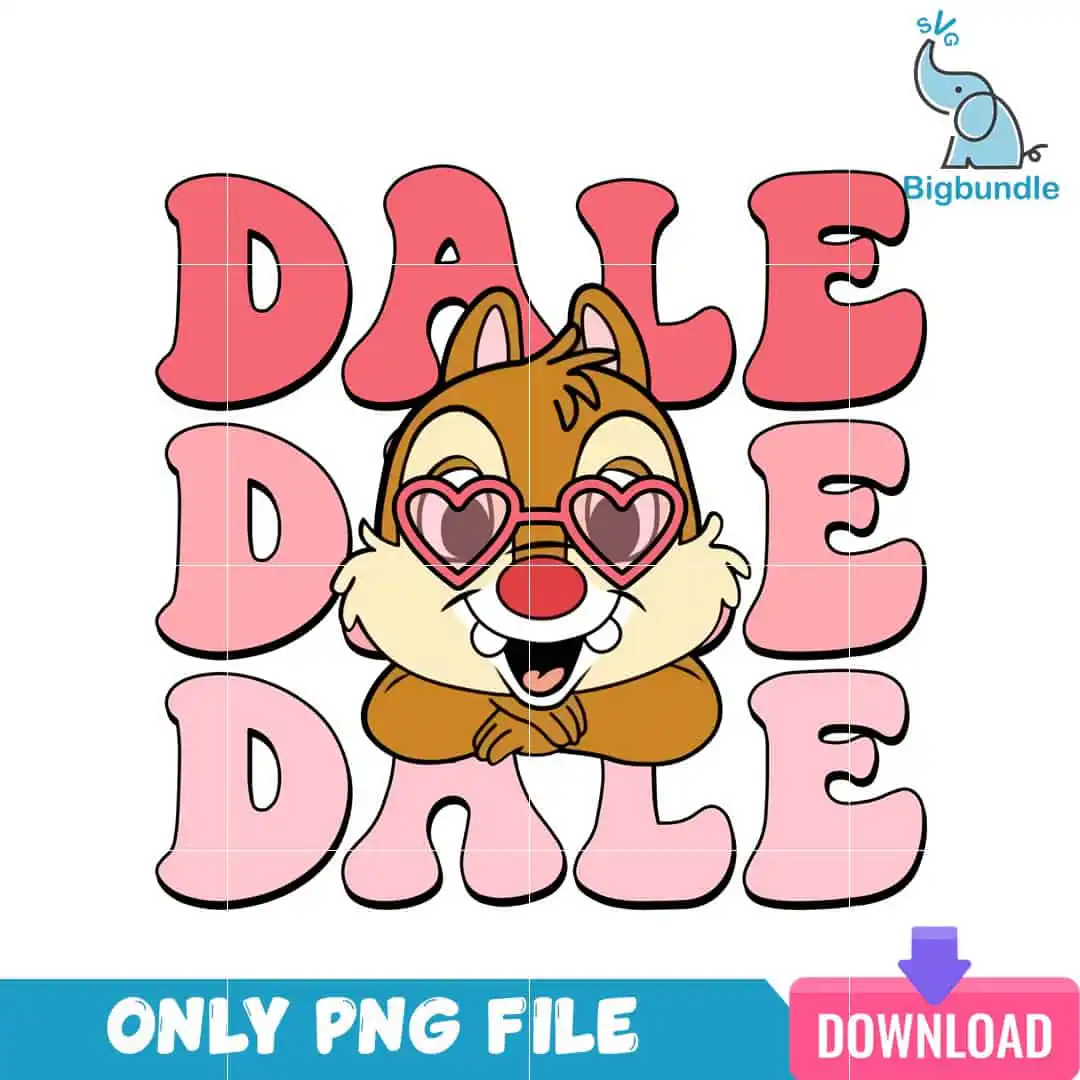
This Chip ‘n’ Dale style PNG is a single retro cartoon chipmunk design, showing Dale in heart-shaped pink sunglasses with the word DALE repeated in bubble lettering. You receive one PNG file at 300 dpi with a transparent background, made for sublimation printing, DTF transfers and print-and-cut projects. The artwork is built around coral pink, light pink, caramel brown and cream, with a red accent and a dark outline that keeps the character bold on fabric or ceramic. Its playful, romantic mood suits Valentine’s Day, but the design works just as well for everyday wear. The chipmunk head, ears, nose, teeth and paws are all drawn in the same heavy outline style. You can place it on a t-shirt, sweatshirt, tote bag, mug or tumbler wrap, and it also works as a sticker. Because the file is transparent, the white space around the character will not print on dark or coloured blanks.
Design breakdown
This design is cut in 5 layers and uses 7 colours: coral pink, light pink, caramel brown, cream, red, a dark outline and white. The chipmunk character head, ears, nose, teeth and paws sit in caramel brown and cream, while the heart-shaped sunglasses are coral pink and light pink, and the DALE lettering appears three times in red and coral pink bubble letters. The dark outline runs around every shape. It is a medium-complexity cut, so fine details such as the teeth and the gaps between the sunglasses and the face are best cut at 4 inches or larger. The file has a white background and a portrait orientation, delivered as a single sheet with one design on it.
| Colours | 7 — coral pink (#E8646E), light pink (#F4AFC0), caramel brown (#B87333), cream (#F7E7CE), red (#E0474C), dark outline (#2B1B17) |
|---|---|
| Lettering | DALE / DALE / DALE |
| Background | white |
| Orientation | portrait |
What’s included
- PNG (300 dpi, transparent background)
Works with
- Sublimation printers (Epson, Sawgrass)
- DTF / print-and-cut workflows
- Canva
- Adobe Photoshop
How to use
Download the ZIP from your order and unzip it to a folder on your computer. Open the PNG in your design software, such as Canva or Adobe Photoshop, or import it into your sublimation or DTF print software. Size the chipmunk to fit your blank, keeping the proportions locked so the bubble lettering stays readable. Print at 300 dpi on your sublimation printer or DTF setup, then press or apply the transfer to your item as your printer’s instructions describe.
Licence
Personal and small-business commercial use. Sell finished physical items; do not resell or redistribute the files themselves.
FAQ
What files are included with this Dale Valentine PNG?
You get one PNG file at 300 dpi with a transparent background. It is a single design sheet with one chipmunk character on it, so there are no extra variations or bundled files.
Can I put this Dale design on a 20oz tumbler?
Yes, the design works on a 20oz tumbler when it is printed as a sublimation wrap. Scale the artwork to the wrap height on your template, and keep the DALE lettering centred so it reads from the front.
Which printers and software can I use with this file?
It works with sublimation printers such as Epson and Sawgrass, with DTF and print-and-cut workflows, and with Canva and Adobe Photoshop. The transparent background means you can layer it over any colour of blank.
Can I resize the PNG and sell the finished items?
Yes, you can resize it to fit your product. The licence covers personal and small-business commercial use, so you can sell finished physical items, but you may not resell or redistribute the design files themselves.