


Disney World Sublimation Designs: Mickey Mouse Leaning on a Large Red D PNG for Disney
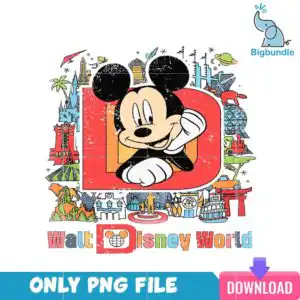
This Disney World sublimation design is one retro illustration of Mickey Mouse leaning on a large red letter D, delivered as a single PNG file with a transparent background. You get a 300 dpi PNG, ready for sublimation printers such as Epson and Sawgrass, DTF workflows, Canva and Adobe Photoshop. The artwork is built for family trip shirts, tumbler wraps and mugs. Inside the red D sits a Mickey-head globe, and around the letter you will find Cinderella Castle, the Spaceship Earth geodesic sphere, a monorail, a steamboat and a hot air balloon. Walt Disney World appears in the lettering, and the palette leans on bold red, orange, black, white and light blue, with yellow and green accents. The vintage travel poster look suits a Disney vacation, a theme park day or a keepsake for the whole family. Because it is a PNG, you can place it on a light or dark garment, and the white background drops away when you print.
Design breakdown
This is one design, shown as a single square preview on a white background, and it is delivered as one PNG file with a transparent background at 300 dpi. The artwork uses eight colours: red, orange, black, white, skin tone, light blue, green and yellow. It features a Mickey Mouse head with black ears, a large red letter D, Cinderella Castle, the Spaceship Earth geodesic sphere, a monorail, the Tree of Life, a steamboat, a Torii-style gate, a Mickey-head globe in the lettering, a planet with rings, a palm tree, a hot air balloon, carousel-style rides and a statue. The text reads Walt Disney World. The design is cut in 25 layers, and its fine details are best cut or printed at 4 inches or larger.
| Colours | 8 — red (#E53A2F), orange (#F28C28), black (#000000), white (#FFFFFF), skin tone (#F9D6B5), light blue (#3BB5E0) |
|---|---|
| Lettering | Walt Disney World / ONLY PNG FILE / DOWNLOAD |
| Background | white |
| Orientation | square |
What’s included
- PNG (300 dpi, transparent background)
Works with
- Sublimation printers (Epson, Sawgrass)
- DTF / print-and-cut workflows
- Canva
- Adobe Photoshop
How to use
Download the ZIP from your order and unzip it to a folder on your computer. Open the PNG in Canva, Adobe Photoshop or your sublimation software, then import it into your layout. Resize it with the corners so the proportions stay locked. Print on sublimation paper with your printer, or send the file to your DTF or print-and-cut setup. Press or wrap your blank as your product requires.
Licence
Personal and small-business commercial use. Sell finished physical items; do not resell or redistribute the files themselves.
FAQ
What files are included with this Disney World sublimation design?
You receive one PNG file at 300 dpi with a transparent background. The file is the full square illustration, ready to import into your design software.
Can I use this Mickey Mouse leaning design on a 20oz tumbler?
Yes, the square PNG works for tumbler wraps as well as shirts. Resize it to fit your wrap, and keep the design at 4 inches or larger so the smaller objects stay clear.
Which printers and software does this PNG work with?
It works with Epson and Sawgrass sublimation printers, DTF and print-and-cut workflows, Canva and Adobe Photoshop. The transparent background means the white edges do not print.
Can I resell shirts made with this design?
Yes, for personal and small-business commercial use you can sell finished physical items made with it. You may not resell or redistribute the PNG file itself.


