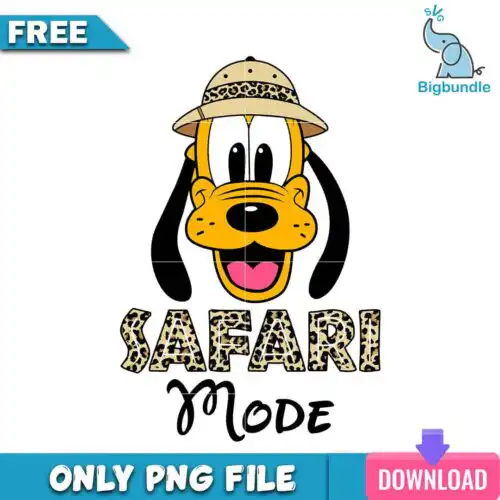
Pluto SVG files are cut and print designs of the classic cartoon pup, with cut-file designs that include SVG, PNG (300 dpi, transparent), DXF, EPS and PDF and PNG-only options for sublimation, made for shirts, mugs, tumblers, stickers and party decor. These designs are united by that goofy, loyal dog energy — floppy ears, big nose, expressive poses — but the collection mixes styles from clean single-color silhouettes to retro badges, ghost costumes, skeleton looks, safari mode and Christmas looks with Santa hats and chimneys. Year-round in spirit, they cover everyday fan crafts plus Halloween and Christmas, so you can pick a look that fits kids tees, family matching sets, trick-or-treat bags, ornaments and mugs.
Choosing the right design
Start by deciding how you want to make it. Single-layer silhouettes and bold outlines cut fastest and weed cleanly, so they are best for small items like baby onesies, ornament circles, pocket logos and vinyl decals. Layered or distressed retro badge versions with text effects look great large on the front of adult shirts and tote bags. For Halloween ghost and skeleton looks, check whether the design is all-black or has white knockouts that need a dark shirt to show. For Christmas chimney and Santa suit looks, look for versions with built-in background shapes so you can press on light and dark shirts. Before cutting, open the file list for that design — cut-file designs include SVG, PNG, DXF, EPS and PDF while PNG-only designs are for sublimation and printing — and check the size, layer colors and whether a background is included.
Which Pluto SVG is best for shirts vs mugs and tumblers?
Use bold, clean silhouettes and single-color outlines for mugs and tumblers and fuller badge or scene versions for shirts. Mugs and tumblers have tight, curved space, so fine text and tiny bone or bat details get lost and peel, while shirts can hold distressing, drippy lettering and larger badge frames. If you are doing sublimation on mugs, pick the PNG (300 dpi, transparent) versions for a smooth wrap.
Pluto SVG vs png which file should I use
Use SVG, DXF, EPS or PDF when you are cutting vinyl and PNG when you are printing. Cut-file designs include SVG, PNG (300 dpi, transparent), DXF, EPS and PDF for Cricut Design Space, Silhouette Studio, Brother ScanNCut and laser cutters, while PNG-only designs are made for sublimation printers, DTF and print-and-cut. Each design lists its own files, so check before you buy. PNG works great for full-color Halloween and Christmas looks.
How to cut layered Pluto SVG on Cricut or silhouette?
Ungroup the layers in Design Space or Silhouette Studio, size the whole group together, then cut by color. These Pluto SVG designs come as ready-to-cut layers, so you can hide or delete extra costume pieces, change layer colors, and mirror for HTV. For layered versions, use transfer tape for vinyl or press one HTV color at a time at low temp, tacking for 3-5 seconds until all layers are placed, then do a final full press.
What size should Pluto SVG be for adult youth and baby shirts?
Size adult fronts to 10-11 inches wide, youth to 8-9 inches, toddler to 6-7 inches and baby onesies to 4-5 inches wide. These designs are mixed width because of ears and tails, so scale by width, not height, and keep Halloween badge text at least 0.4 inches tall so it weeds. For pocket or sleeve hits, use 3-3.5 inches regardless of age and choose a single-layer version.
It depends on the design type. Cut-file designs include SVG, PNG (300 dpi, transparent background), DXF, EPS and PDF so you can cut with Cricut, Silhouette, ScanNCut or laser and also print. PNG-only designs are PNG (300 dpi, transparent background) for sublimation, DTF and print-and-cut. Each product page lists exactly what is included for that design.
Do Pluto SVG files work with Cricut and Silhouette?
Yes. SVG works natively in Cricut Design Space and Silhouette Studio Designer Edition, DXF works in basic Silhouette Studio, and PNG works in Canva, Photoshop, Illustrator and sublimation workflows. Files also open in Inkscape, CorelDRAW, Brother ScanNCut and DTF workflows. If you use the free Silhouette Studio version, pick DXF or PNG.
Can I sell shirts and mugs I make with these Pluto SVG files?
Yes for finished physical items. Personal and small-business commercial use is allowed, so you can sell shirts, mugs, tumblers, stickers and other physical crafts you make. You cannot resell, share or redistribute the digital files themselves as cut files, clipart or print files.
Instant Download Download immediately after successful payment
Secure Payment Experience 100% secure payments, ensuring your transactions are safe.
Outstanding Support Service beyond compare with our exceptional team.
Premium Quality We are meticulous in every detail, ensuring unparalleled excellence.