
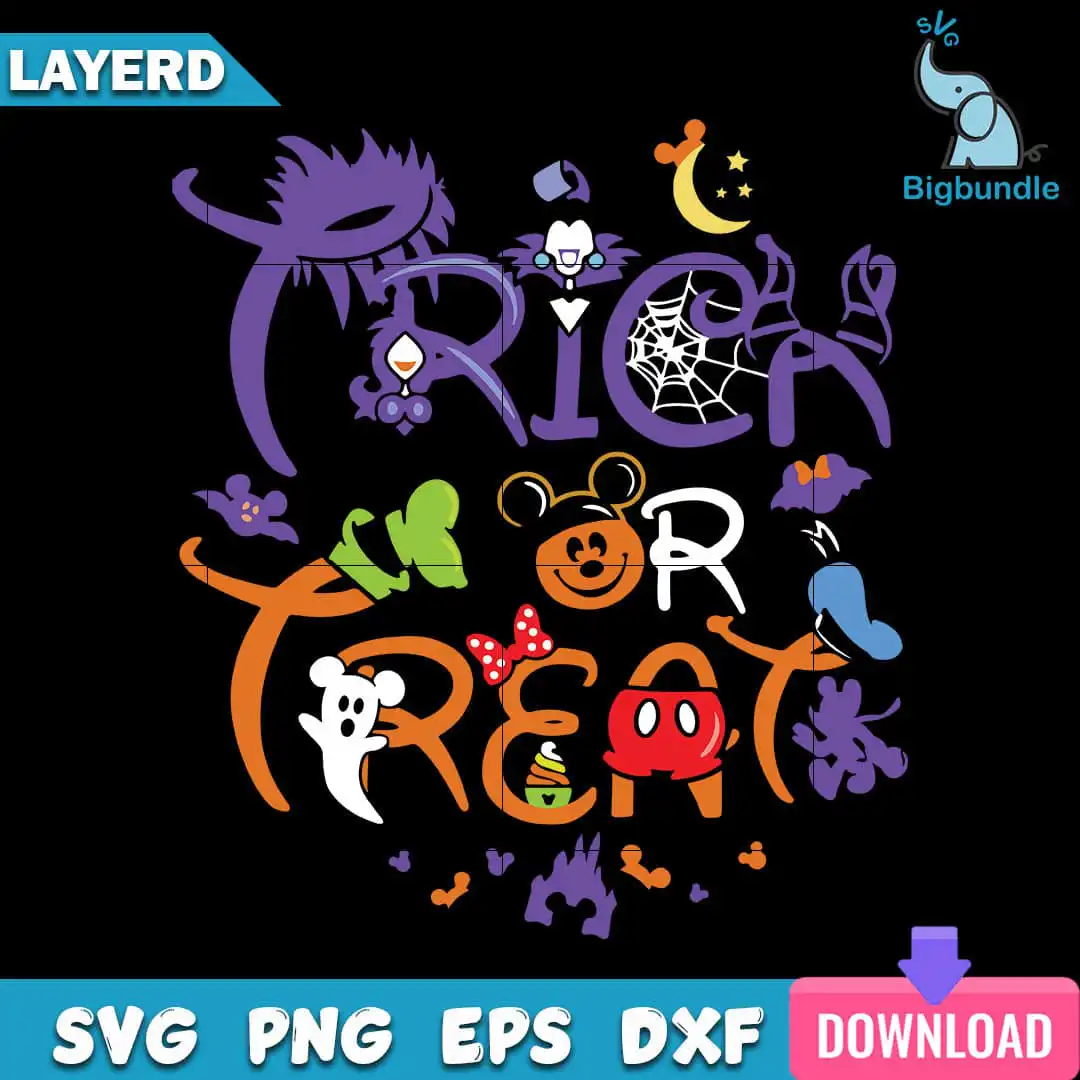
Trick Or Treat Disney Halloween Shirt Cut File with Mickey Pumpkin Lettering
This Trick Or Treat Halloween design is a single layered SVG cut file that spells TRICK, OR and TREAT in bold display lettering with Disney-inspired characters and Halloween motifs. You receive SVG, PNG, DXF, EPS and PDF files, made for T-shirts, tote bags, mugs, decals and vinyl cutting. The lettering is set against a black background and built from bold orange, purple and green, with white and yellow accents. Among the motifs are a Mickey Mouse pumpkin face, a Minnie Mouse bow, a Mickey Mouse ghost, a candy corn cone, a spider web, a crescent moon with stars, bats and a witch hat. Smaller touches include a cauldron, a castle silhouette and Maleficent-style horns. Families planning trick-or-treating or a Disney trip in autumn will find it fits many projects. The artwork is cartoon and whimsical rather than frightening, so it suits kids as well as adults.
Design breakdown
The design is cut in 6 layers and uses 8 colours: black background, purple, orange, green, red, white, yellow and blue. The main lettering TRICK, OR and TREAT is set in bold display type, with the Mickey Mouse pumpkin face, Minnie Mouse bow, Mickey Mouse ghost, Mickey Mouse head silhouette, Mickey Mouse red shorts, candy corn cone and crescent moon with stars among the motifs shown in the preview. Other figures in the artwork include the Ursula-style tentacle shapes, a Donald-style duck hat, a Goofy-style hand, Maleficent-style horns and a cauldron. The file is cut at high complexity, so fine details such as the spider web and the bats are best cut at 4 inches or larger. The black background is part of the artwork, so for vinyl you can weed it out or cut the layers separately.
| Layers | 6 |
|---|---|
| Colours | 8 — black background (#000000), purple (#6B3FA0), orange (#E8821E), green (#7BC043), red (#D92B2B), white (#FFFFFF) |
| Lettering | TRICK / OR / TREAT |
| Background | dark |
| Cut complexity | high |
| Orientation | square |
What’s included
- SVG
- PNG (300 dpi, transparent)
- DXF
- EPS
Works with
- Cricut Design Space
- Silhouette Studio (Designer Edition)
- Brother ScanNCut
- Adobe Illustrator
- Inkscape
- CorelDRAW
How to use
Download the ZIP from your order and unzip it to a folder on your computer. Open Cricut Design Space, Silhouette Studio or Brother ScanNCut and choose Upload, then select the SVG file. Check the layers in the layers panel, then resize the design to your project. For a T-shirt, use the PNG file with a printer, or cut the layers from vinyl and press them on in order.
Licence
Personal and small-business commercial use. Sell finished physical items; do not resell or redistribute the files themselves.
FAQ
What files are included with this Trick Or Treat design?
You get SVG, PNG, DXF, EPS and PDF files. The PNG is 300 dpi with a transparent background, so it works for printing and sublimation.
Can I put this Trick Or Treat design on a 20oz tumbler?
Yes, the design works on a 20oz tumbler when you use the PNG or a sublimation-ready file. Resize it to fit the wrap area before printing.
Which machines and programs does this file work with?
It works with Cricut Design Space, Silhouette Studio (Designer Edition), Brother ScanNCut, Adobe Illustrator, Inkscape and CorelDRAW. The SVG is the best choice for cutting machines.
Can I resize the design and use it for my small business?
Yes, you can resize it freely. The licence covers personal and small-business commercial use, so you can sell finished physical items, but you may not resell or redistribute the files themselves.


