

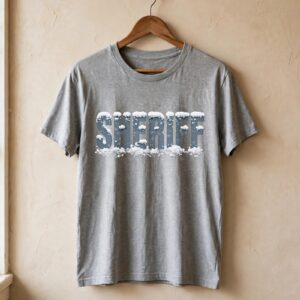
Disney Sheriff Car Christmas Sublimation Design for Shirts, Mugs and Tumblers
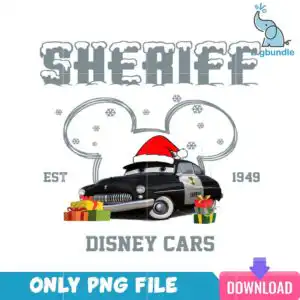
This Disney Sheriff Car design is a single cartoon illustration of the Sheriff police car from Disney Cars, wearing a red Santa hat, and it comes as one PNG file with a transparent background, ready for sublimation printing. The artwork sits inside a snowy Mickey Mouse ear outline, with wrapped gift boxes in red, green and gold yellow stacked beside the car. The lettering reads SHERIFF, EST 1949 and DISNEY CARS in snow-capped block letters, set against a white background that you can remove when you print. Slate grey, Santa red, near-black, white, green and gold yellow make up the palette, so the design suits shirts, sweatshirts, mugs and tumblers for a playful Christmas gift. Disney fans, Cars fans and police and sheriff enthusiasts will recognise the character straight away. Because the file is a PNG at 300 dpi, you can place it in Canva or Adobe Photoshop and resize it without losing sharpness.
Design breakdown
The design is cut in 3 layers and uses six colours: slate grey, Santa red, near-black, white, green and gold yellow. The main elements are the Sheriff police car, a red Santa hat with a white pom-pom, wrapped gift boxes in red, green and yellow with ribbons, a Mickey Mouse ear outline with snow caps, snowflakes, and snow-capped block letters reading SHERIFF, EST 1949, DISNEY CARS, ONLY PNG FILE and DOWNLOAD. The file is supplied as a single PNG on a transparent background with no cut lines, so it is best used for printing and transfer rather than vinyl cutting. Fine details such as the snowflakes and ribbons are best printed at 4 inches or larger.
| Colours | 6 — slate grey (#8A9499), Santa red (#D8252B), near-black (#1E2326), white (#FFFFFF), green (#3E8E41), gold yellow (#F2C230) |
|---|---|
| Lettering | SHERIFF / EST 1949 / DISNEY CARS / ONLY PNG FILE / DOWNLOAD |
| Background | white |
| Orientation | portrait |
What’s included
- PNG (300 dpi, transparent background)
Works with
- Sublimation printers (Epson, Sawgrass)
- DTF / print-and-cut workflows
- Canva
- Adobe Photoshop
How to use
Download the ZIP from your order page and unzip it to a folder on your computer. Open the PNG in your design software, such as Canva, Photoshop or your sublimation printer’s software. Resize it to your blank, keeping the proportions locked, then print it on sublimation paper in mirror image if your workflow requires it. Press it onto your shirt, mug or tumbler as normal.
Licence
Personal and small-business commercial use. Sell finished physical items; do not resell or redistribute the files themselves.
FAQ
What files do I get with this Disney Sheriff Car design?
You get one PNG file at 300 dpi with a transparent background. The file contains a single design, with no extra variations included.
Can I use this Sheriff Car design on a 20oz tumbler?
Yes, the design works on a 20oz tumbler when printed with sublimation. Resize it to the wrap width and check that the snowflakes and ribbons still look clear at the final size.
Does this PNG work with Epson or Sawgrass printers?
Yes, it works with sublimation printers including Epson and Sawgrass models. It also works with DTF and print-and-cut workflows, and you can open it in Canva or Adobe Photoshop.
Can I resize this file and sell the finished shirts?
You can resize the PNG for your own projects. The licence covers personal and small-business commercial use, so you can sell finished physical items, but you may not resell or redistribute the files themselves.


