Little Elf Christmas Elf Costume Design for Shirts, Tumblers and Holiday Signs
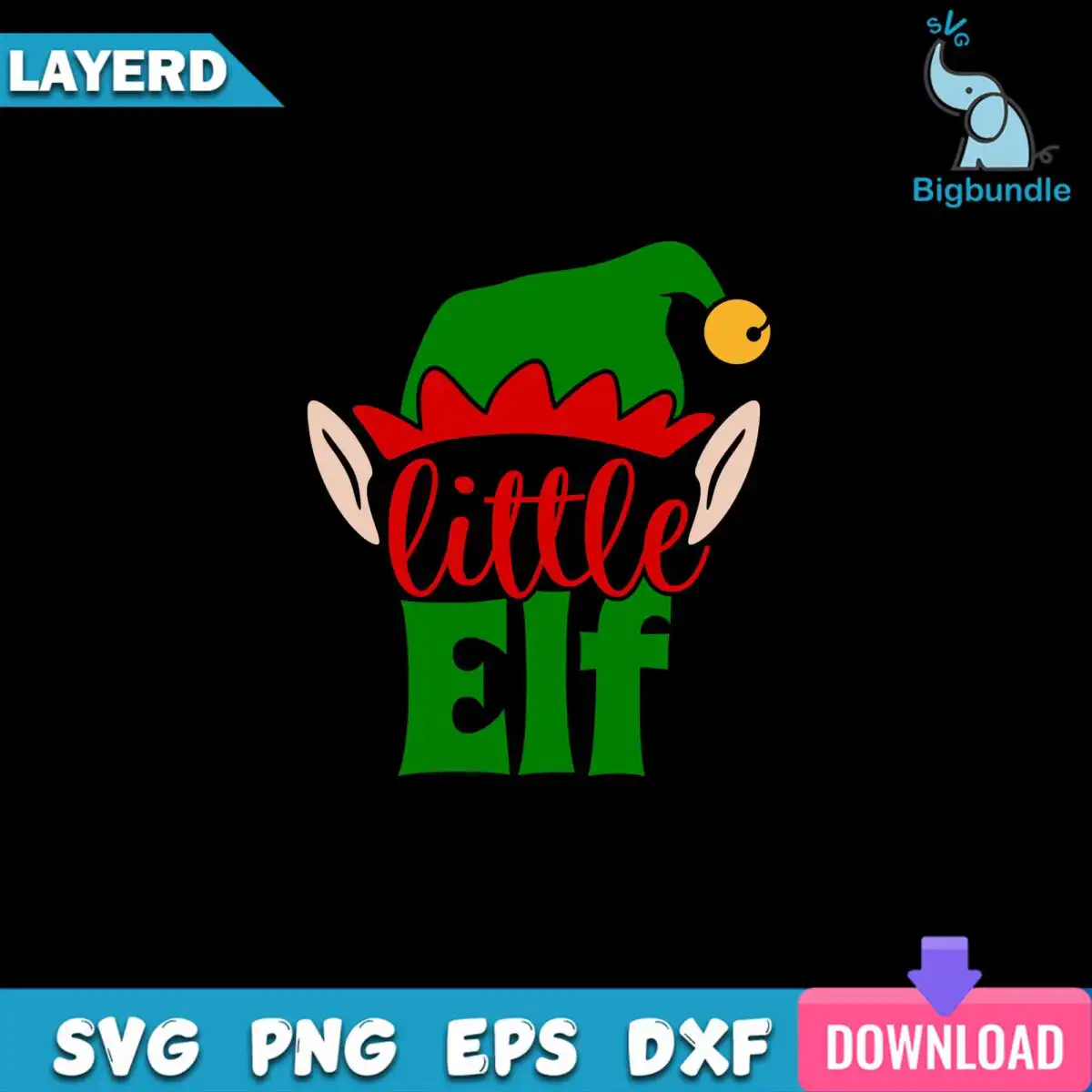
This Little Elf design is a single cartoon Christmas elf costume graphic, delivered as one cut file in SVG, PNG, DXF, EPS and PDF formats, made for shirts, onesies, tumblers, holiday signs and vinyl decals. The lettering reads “little” above a bold “Elf”, set in a mix of bold sans-serif and script. Beneath it sits a green elf hat with red zigzag trim, a gold bell at the tip and two pointed elf ears in a warm skin tone, all in flat vector shapes with a black outline. The artwork suits Christmas parties, holiday class events and matching family costumes, so parents, kids and crafters can all use the same look. The design is shown on a dark background in the preview, and the colours are bold enough to stand out on a dark shirt or a cocoa-brown tumbler.
Design breakdown
This is one design, not a bundle. It is built from flat vector shapes in five colours: green (the hat), red (the zigzag trim), gold (the bell), skin tone (the ears and face area) and black (the lettering and outlines). The artwork is cut in 6 layers, which lets you cut each colour separately for vinyl or layer it in a cutting program. The fine zigzag trim and the small bell are the most detailed parts, so cut the design at 4 inches or larger for clean edges. The PNG version is 300 dpi with a transparent background, ready for sublimation printing.
| Layers | 6 |
|---|---|
| Colours | 5 — green (#008000), red (#D42A2A), gold (#F2C230), skin tone (#F7D2B8), black (#000000) |
| Lettering | little / Elf |
| Background | dark |
| Cut complexity | medium |
| Orientation | portrait |
What’s included
- SVG
- PNG (300 dpi, transparent)
- DXF
- EPS
Works with
- Cricut Design Space
- Silhouette Studio (Designer Edition)
- Brother ScanNCut
- Adobe Illustrator
- Inkscape
- CorelDRAW
How to use
Download the zip file from your order and unzip it on your computer before doing anything else. Open the SVG file in Cricut Design Space, Silhouette Studio or Brother ScanNCut by choosing Import or Open, then check the layers in the layers panel. For printing, use the transparent PNG in your sublimation or print software. Resize the design in the program, keep the proportions locked, then cut or print.
Licence
Personal and small-business commercial use. Sell finished physical items; do not resell or redistribute the files themselves.
FAQ
What files do I get with this Little Elf design?
You get SVG, PNG, DXF, EPS and PDF files. The PNG is 300 dpi with a transparent background, so it works for printing and sublimation without a white box around the elf.
Can I put this elf design on a 20oz tumbler?
Yes, the design works on a 20oz tumbler using the PNG file for sublimation or the SVG for vinyl. Check the design size when you resize it so the hat, bell and lettering fit your wrap.
Which machines and programs work with these files?
The files work with Cricut Design Space, Silhouette Studio (Designer Edition), Brother ScanNCut, Adobe Illustrator, Inkscape and CorelDRAW. The SVG and DXF files suit cutting machines, and the PNG suits printing.
Can I resize this design and use it for my small business?
Yes, you can resize the file in your software for personal and small-business commercial use. You may sell finished physical items made with it, but you may not resell or redistribute the design files themselves.