Mickey Mouse Head Shaped Pumpkin Halloween PNG for Shirts, Mugs and Totes
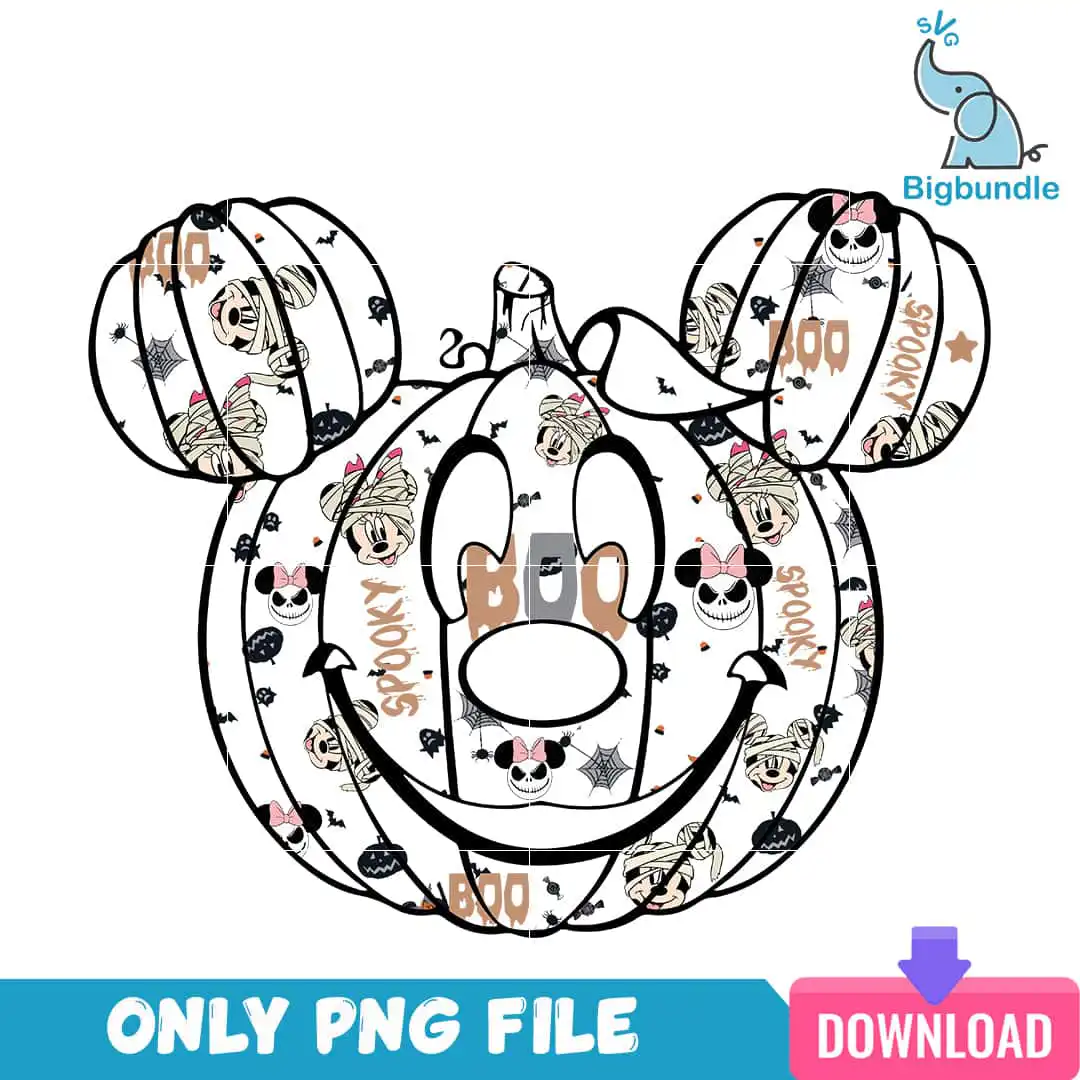
This Mickey Mouse head shaped pumpkin is a single Halloween design delivered as a PNG file with a transparent background, made for sublimation, DTF and print-and-cut projects. The artwork shows Mickey’s head drawn as a jack-o’-lantern, with a curly vine stem and pumpkin ridges, and it is filled from edge to edge with mini Disney Halloween characters. You will find Minnie heads with pink bows, Jack Skellington heads, mummy-wrapped Mickey and Minnie heads, bats, spiders, spider webs and candy corn, all set against a white ground. The lettering reads BOO and SPOOKY, so you can press it straight onto a Halloween tee, sweatshirt, tote bag or mug. Because the design uses black, white, tan caramel orange and pink, it suits a Disney trip, a costume party or a classroom Halloween day. Each file is ready to open in Canva, Adobe Photoshop or your sublimation software.
Design breakdown
This design is cut in 4 layers and uses four colours: black, white, tan caramel orange and pink. The black carries the pumpkin outline, facial features, spider webs, bats and spiders, while the tan caramel orange fills the pumpkin body and the pink sits on Minnie’s bows. The white appears as the background and as highlights inside the characters. The artwork includes the Mickey Mouse head silhouette, pumpkin ridges, pumpkin stem, a curly vine tendril, Minnie Mouse heads with pink bows, Jack Skellington heads, mummy-wrapped Mickey and Minnie heads, spider webs, bats, spiders, candy corn, black pumpkins and stars. The lettering BOO, SPOOKY and BOO is placed within the pattern. Fine details such as the web lines and small spiders are best cut at 4 inches or larger.
| Colours | 4 — black (#000000), white (#FFFFFF), tan/caramel orange (#C98A5E), pink (#F4B6C8) |
|---|---|
| Lettering | BOO / SPOOKY / BOO |
| Background | white |
| Orientation | square |
What’s included
- PNG (300 dpi, transparent background)
Works with
- Sublimation printers (Epson, Sawgrass)
- DTF / print-and-cut workflows
- Canva
- Adobe Photoshop
How to use
Download the zip file from your order and unzip it to a folder on your computer. Open the PNG in Canva, Adobe Photoshop or your sublimation software, then import it into a document sized for your blank. Check that the transparent background is preserved and resize the design proportionally. For a sublimation print, mirror the image if your workflow requires it, then print and press as usual.
Licence
Personal and small-business commercial use. Sell finished physical items; do not resell or redistribute the files themselves.
FAQ
What files are included with this Mickey pumpkin head design?
You get one PNG file at 300 dpi with a transparent background. The file is ready for sublimation printers, DTF and print-and-cut workflows, and it opens in Canva and Adobe Photoshop.
Can I use this Mickey Halloween design on a 20oz tumbler?
Yes, the design can be printed on a 20oz tumbler using sublimation. Resize the PNG to fit your wrap template, keeping the proportions so the pumpkin face stays centred.
Which printers and software work with this PNG?
It works with Epson and Sawgrass sublimation printers, DTF and print-and-cut setups, and design programs such as Canva and Adobe Photoshop.
Can I resize the file and sell finished shirts made with it?
You can resize the file for your projects. The licence covers personal and small-business commercial use for selling finished physical items, but you may not resell or redistribute the files themselves.