Trick or Treat Duck Halloween Cut File for Shirts, Bags and Mugs
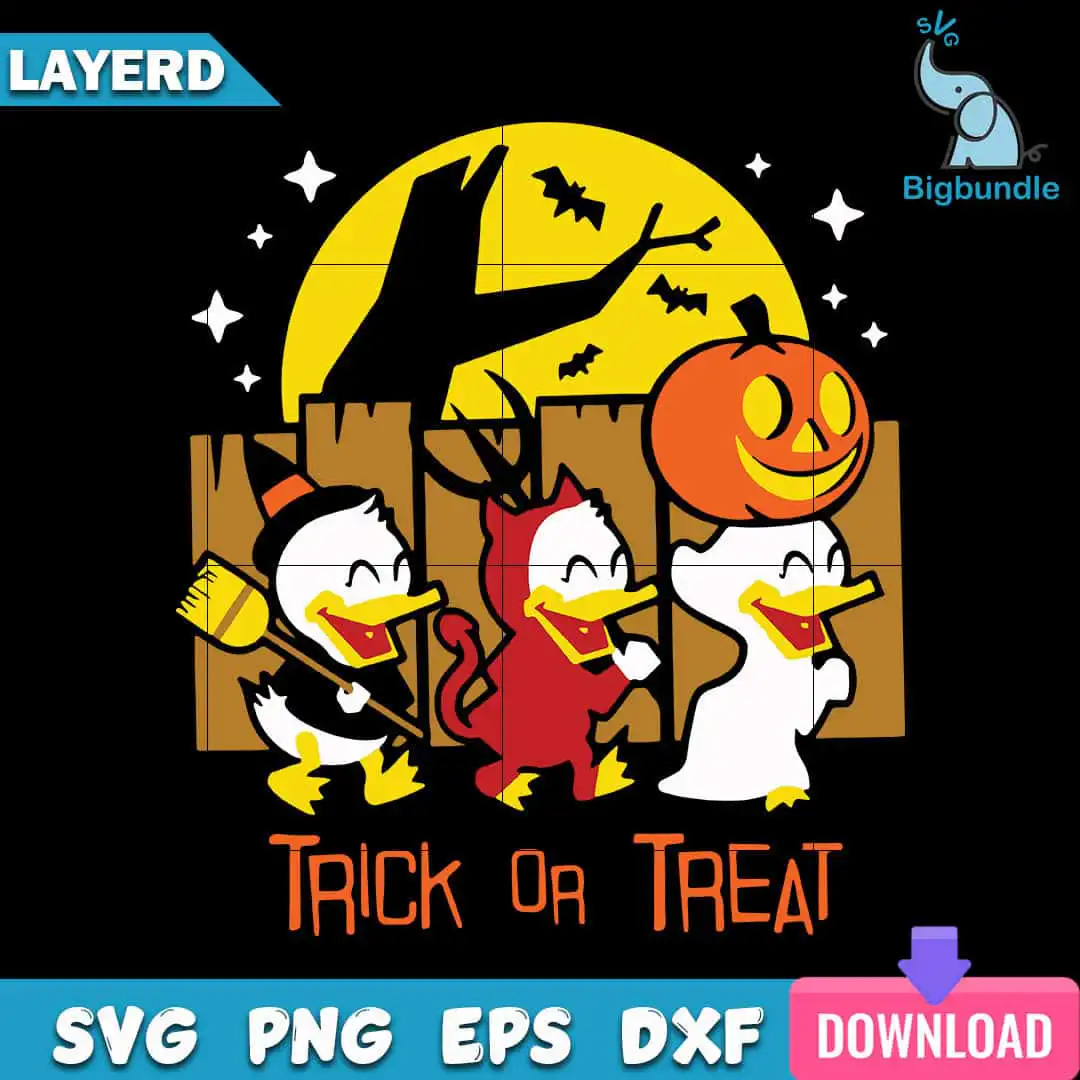
This Trick or Treat Duck design is a single square Halloween artwork of three cartoon ducklings trick-or-treating in front of a full moon, delivered as SVG, PNG, DXF, EPS and PDF files. It is made for shirts, trick-or-treat bags, party decor, mugs and vinyl decals. Inside the scene, one duckling wears a black witch hat and holds a broom, another wears a red devil costume with horns and a tail, and a third wears a white ghost sheet and holds a jack-o’-lantern. The full yellow moon sits behind a bare tree silhouette, bats, sparkle stars and a wooden fence, with the words TRICK OR TREAT set across the top in bold orange and black. The palette is black, yellow, orange, red, white and brown on a dark background, so the ducklings stand out. The flat colour and clean vector shapes keep the lines crisp when you cut vinyl or print sublimation transfers.
Design breakdown
The design is cut in 12 layers and uses six flat colours: black, yellow, orange, red, white and brown. The ducklings, moon, pumpkin, bats, stars, tree and fence are separate shapes, so you can weed or colour each part individually. The witch, devil and ghost costumes use red, white and black details, and the TRICK OR TREAT lettering sits in its own layer. It is a medium-complexity cut, so fine details such as the horns, broom and bats are best cut at 4 inches or larger. The artwork is designed on a dark background, so you may want to remove the background before printing or pressing light-coloured materials.
| Layers | 12 |
|---|---|
| Colours | 6 — black (#000000), yellow (#F5C518), orange (#E8792B), red (#D12B2B), white (#FFFFFF), brown (#8B5A2B) |
| Lettering | TRICK OR TREAT |
| Background | dark |
| Cut complexity | medium |
| Orientation | square |
What’s included
- SVG
- PNG (300 dpi, transparent)
- DXF
- EPS
Works with
- Cricut Design Space
- Silhouette Studio (Designer Edition)
- Brother ScanNCut
- Adobe Illustrator
- Inkscape
- CorelDRAW
How to use
Download the zip file from your order and unzip it to a folder on your computer. Open Cricut Design Space, Silhouette Studio, Brother ScanNCut or your design program, then choose Upload and import the SVG file. For printing, use the PNG file, which has a transparent 300 dpi background, or the EPS or PDF for print shops. Resize the image before cutting so the small details still read clearly.
Licence
Personal and small-business commercial use. Sell finished physical items; do not resell or redistribute the files themselves.
FAQ
What files come with the Trick or Treat Duck design?
You get SVG, PNG, DXF, EPS and PDF files. The PNG is 300 dpi with a transparent background, which suits sublimation and printing.
Can I put this Halloween duck design on a youth shirt?
Yes, the design works on youth shirts as well as adult tees. Cut the vinyl at a size that leaves the costumes and TRICK OR TREAT lettering readable on the smaller garment.
Which machines and programs does this file work with?
It works with Cricut Design Space, Silhouette Studio (Designer Edition), Brother ScanNCut, Adobe Illustrator, Inkscape and CorelDRAW. The SVG, DXF and EPS formats cover most cutting and design software.
Can I resize this design and sell the finished products?
Yes, you can resize it for personal and small-business commercial use. You can sell finished physical items made with it, but you may not resell or redistribute the files themselves.