

Valentine’s Day Chip ‘n’ Dale Style PNG: Chipmunk in Heart Sunglasses for Shirts, Mugs
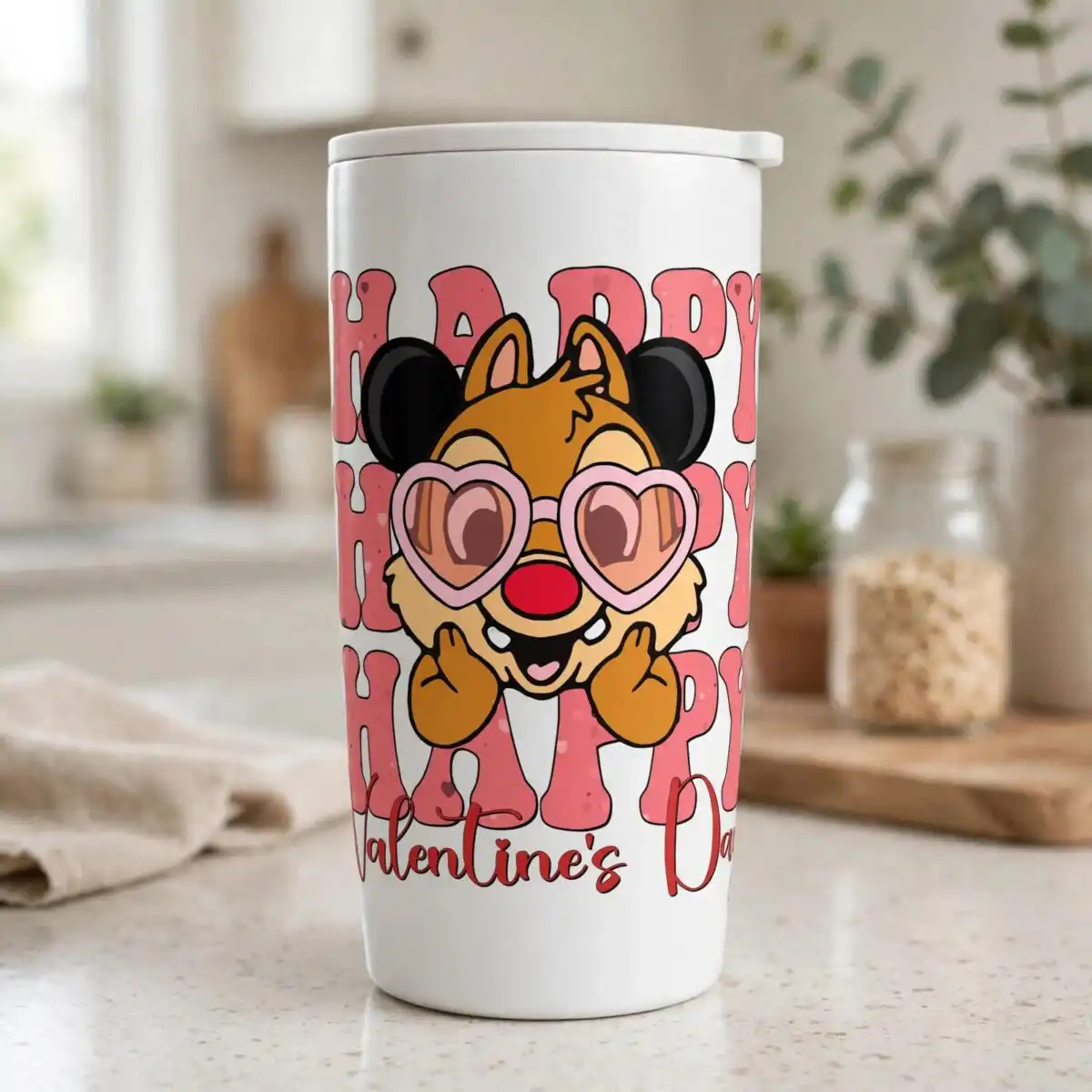
This Valentine’s Day Chip ‘n’ Dale style design is a single chipmunk character illustration, delivered as one transparent PNG file at 300 dpi. The chipmunk wears heart-shaped light pink sunglasses and has black mouse-style ears, a red nose and raised paws. Stacked HAPPY lettering sits above the words Valentine’s Day, set in retro groovy type with bold black outlines. The palette runs from coral pink and deep red to orange-brown fur, light tan and black, so the artwork reads clearly on light fabric or paper. Because the background is transparent, you can place it straight into your layout. It suits sublimation printing, DTF transfers, print-and-cut vinyl and mugs, and it works for card and sticker projects too. Each file is ready to print once you have set its size in your software.
Design breakdown
The design is a single flat-colour illustration with a white background that is removed in the PNG, so only the artwork remains. It uses six colours: coral pink, deep red, orange-brown fur, light tan, light pink for the glasses, and black for the ears and outlines. The main character head, black ears, heart-shaped sunglasses, red nose, raised paws and stacked HAPPY lettering are separate shapes that sit on one another. Fine details such as the sunglass edges and the lettering outlines are best cut or printed at 4 inches or larger. The file is a single design on one sheet, with no extra elements or variations included.
| Colours | 6 — coral pink (#F26D6D), deep red (#C8232C), orange-brown fur (#B8702A), light tan (#F4C58A), light pink glasses (#F7B7C9), black ears and outlines (#1E1E1E) |
|---|---|
| Lettering | HAPPY / HAPPY / HAPPY / Valentine’s Day |
| Background | white |
| Orientation | portrait |
What’s included
- PNG (300 dpi, transparent background)
Works with
- Sublimation printers (Epson, Sawgrass)
- DTF / print-and-cut workflows
- Canva
- Adobe Photoshop
How to use
Download the order and unzip the folder on your computer. Open the PNG in Canva, Adobe Photoshop or your sublimation or DTF software. Import it onto a new page or canvas, then resize it to the width you need for your project. Check the transparent background is still clear before you send it to print. For cutting machines, print the design and cut around the outline, or import the PNG into your cutting software as a print-and-cut image.
Licence
Personal and small-business commercial use. Sell finished physical items; do not resell or redistribute the files themselves.
FAQ
What files do I get with this Valentine’s Day Chip ‘n’ Dale style design?
You get one PNG file at 300 dpi with a transparent background. It is a single design on one sheet, with no extra variations included.
Can I use this chipmunk design on a 20oz tumbler?
Yes, the design can be placed on a 20oz tumbler using sublimation printing. Resize the PNG to fit the wrap area of your tumbler before printing, and check that the sunglasses and HAPPY lettering are large enough to read at that size.
Does this PNG work with sublimation printers and Canva?
Yes, it works with sublimation printers such as Epson and Sawgrass, and with DTF and print-and-cut workflows. It also opens in Canva and Adobe Photoshop.
Can I resize the file and use it for a small business?
Yes, you can resize the PNG for your projects. The licence covers personal and small-business commercial use, so you can sell finished physical items, but you may not resell or redistribute the files themselves.