Xoxo Mickey Love Valentine PNG for Shirts, Mugs and Tote Bags
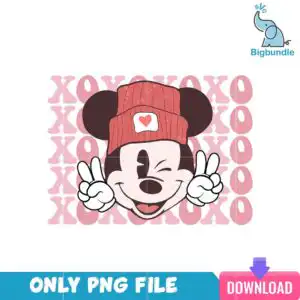
The XOXO Mickey Love Valentine PNG is a single illustrated Mickey Mouse design, delivered as a transparent PNG file made for sublimation printing and print-and-cut projects. Mickey stands in a coral red knit beanie with a white heart patch, winking and smiling while he makes peace-sign hands with his white gloves. Behind him, stacked XOXO lettering in light pink fills the background, and his face and big round ears are drawn in dark brown and pale skin pink. You get one PNG at 300 dpi with a transparent background, so the artwork drops straight onto a light or white garment without a box around it. It suits Valentine’s Day gifts and everyday winter wear, and it prints cleanly on T-shirts, sweatshirts, mugs and tote bags. The retro, vintage-inspired style keeps the whole piece playful, cheerful and a little romantic, which is why it works for Disney fans of every age. Open the file in Canva or Adobe Photoshop to adjust the size before you print.
Design breakdown
The design is cut in 5 layers, using 5 colours: coral red for the beanie, light pink for the XOXO background lettering, dark brown for the ears and face features, white for the gloves and heart patch, and pale skin pink for the face. The file is a single PNG with a transparent background, so no separate cut lines or colour separations are needed for sublimation. Its medium cut complexity means the small features such as the eyes, the heart patch and the finger gaps on the peace-sign hands are best printed at a size where they remain clear, and the stacked XOXO letters are the largest shapes in the artwork.
| Colours | 5 — coral red (beanie) (#D9606A), light pink (XOXO background) (#F4B8C0), dark brown (ears, face features) (#3B1F1A), white (gloves, heart patch) (#FFFFFF), pale skin pink (face) (#F7D9D3) |
|---|---|
| Lettering | XOXO |
| Background | white |
| Orientation | landscape |
What’s included
- PNG (300 dpi, transparent background)
Works with
- Sublimation printers (Epson, Sawgrass)
- DTF / print-and-cut workflows
- Canva
- Adobe Photoshop
How to use
Download the ZIP from your order and unzip it to a folder on your computer. Open the PNG in your design software, such as Canva, Adobe Photoshop or your sublimation printer’s software, and import it into a new document. Resize the image to your product, keeping the proportions locked so Mickey’s ears and the XOXO lettering stay in balance. Print on sublimation paper or send the file through your DTF or print-and-cut workflow, then press or apply it to your blank.
Licence
Personal and small-business commercial use. Sell finished physical items; do not resell or redistribute the files themselves.
FAQ
What files do I get with the XOXO Mickey Love Valentine PNG?
You get one PNG file at 300 dpi with a transparent background. The file is a single design, so there are no extra variations to sort through.
Can I put this Mickey Mouse design on a mug?
Yes, the design works on mugs, and it is also suitable for T-shirts, sweatshirts and tote bags. Resize it in your software so the beanie and XOXO lettering fit within the printable area of your mug.
Which printers and programs work with this PNG?
It works with sublimation printers such as Epson and Sawgrass, with DTF and print-and-cut workflows, and with Canva and Adobe Photoshop. The transparent background means it prints without a white box around Mickey.
Can I resize the design and sell finished items with it?
Yes, you can resize the PNG for your products. The licence covers personal and small-business commercial use, so you can sell finished physical items, but you may not resell or redistribute the files themselves.