Disney Characters Mickey Minnie PNG: Christmas Train Sublimation Design for Shirts
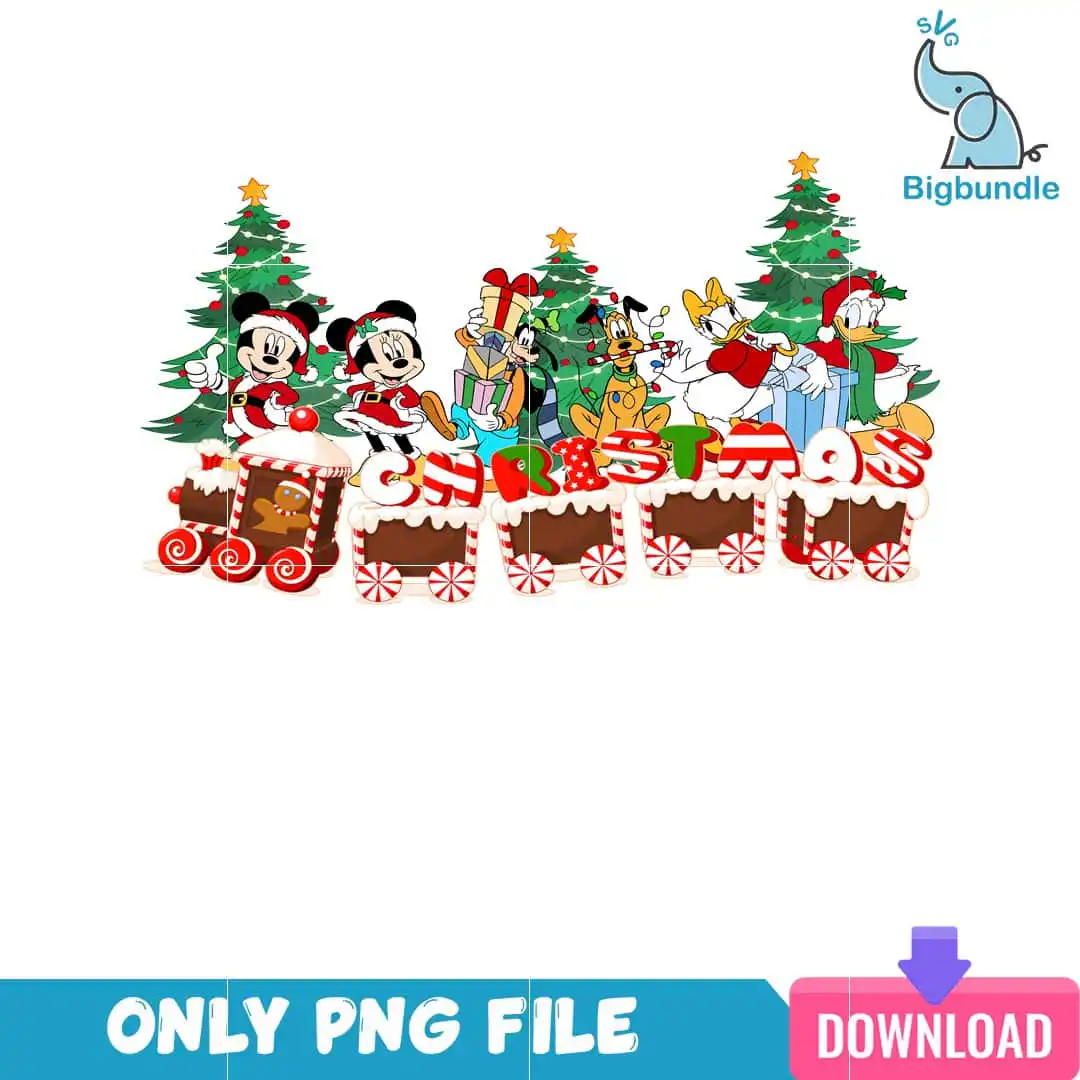
This Disney Characters Mickey Minnie PNG design is a single Christmas illustration of Mickey, Minnie, Goofy, Pluto, Daisy and Donald riding a gingerbread-style train past Christmas trees. You receive one transparent PNG file at 300 dpi, made for sublimation, DTF and print-and-cut projects on shirts, sweatshirts, mugs and tote bags. Mickey and Minnie wear Santa outfits, Goofy holds stacked gifts, and Donald carries a wrapped present. The word CHRISTMAS sits across the artwork in Christmas red, evergreen green, gingerbread brown and star gold, with white and blue gift accents. Gingerbread train cars, peppermint swirl wheels, a candy cane and string lights frame the scene. It suits family holiday parties, Christmas decor and trips to the theme park during the winter season.
Design breakdown
This design is cut in 12 layers and uses six colours: Christmas red, evergreen green, gingerbread brown, star gold, white and blue gift. The artwork is cartoon clip-art style with character illustration throughout. It contains the Disney characters Mickey, Minnie, Goofy, Pluto, Daisy and Donald, a gingerbread man, a candy cane, peppermint swirl wheels, gingerbread train cars, Christmas trees with star toppers, wrapped presents, string lights and the word CHRISTMAS. Fine details such as the string lights and star toppers are best cut or printed at 4 inches or larger. The file has a transparent background and is landscape in orientation.
| Colours | 6 — Christmas red (#C8102E), evergreen green (#1F7A3A), gingerbread brown (#6B3E26), star gold (#FFD200), white (#FFFFFF), blue gift (#3A6FB7) |
|---|---|
| Lettering | CHRISTMAS |
| Background | white |
| Orientation | landscape |
What’s included
- PNG (300 dpi, transparent background)
Works with
- Sublimation printers (Epson, Sawgrass)
- DTF / print-and-cut workflows
- Canva
- Adobe Photoshop
How to use
Download the zip file and extract the PNG to a folder on your computer. Open your design software, such as Canva or Adobe Photoshop, and import the PNG into a new landscape document. Resize it to fit your blank, then print it on a sublimation printer or send it to your DTF or cutting workflow. Check the preview before you press or cut so the characters and lettering are placed as you intend.
Licence
Personal and small-business commercial use. Sell finished physical items; do not resell or redistribute the files themselves.
FAQ
What files do I get with this Christmas train design?
You get one transparent PNG file at 300 dpi. It is a single design, not a bundle, so the file contains the full Christmas train scene with all the characters and the CHRISTMAS lettering.
Can I put this Disney Christmas train on a mug?
Yes, the design suits mugs and tumblers printed by sublimation. Resize the PNG to the wrap area of your mug, keeping the train and characters clear of the handle.
Does this PNG work with sublimation printers and Canva?
Yes, it works with sublimation printers such as Epson and Sawgrass, with DTF and print-and-cut workflows, and with Canva and Adobe Photoshop. The transparent background means no white box will print around the artwork.
Can I resize the file and sell the finished items?
You can resize it for your project and use it for personal and small-business commercial use, selling finished physical items. You may not resell or redistribute the PNG file itself.