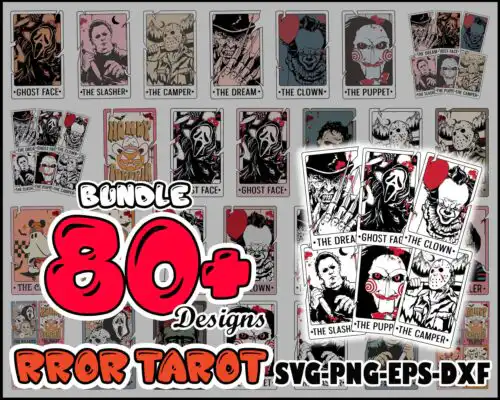
Tarot SVG files are tarot card-inspired artwork for DIY crafts, with cut-file designs including SVG, PNG, DXF, EPS and PDF and print-only designs as 300 dpi transparent PNG, made for shirts, tumblers, tote bags, stickers and wall art. These designs are united by the classic tarot card frame but split across very different moods, from retro Halloween horror and masked slashers to cartoon, kitty and snarky funny takes. That mix makes them perfect for makers who love the mystic layout but want their own sense of humor, whether you sell spooky season shirts, everyday funny gifts, or cute witchy goods year-round.
Choosing the right design
Choose by how you want to make it. Single-layer silhouettes and bold lettering cut fastest and weed cleanly, which suits small items like baby onesies, hats and mugs. Layered or collage-style tarot cards with lots of icons need more space, so save them for adult shirts, tote bags and sublimation tumblers where details stay readable. If you use vinyl, look for clean lines and solid fills. If you print, the detailed bundles work best as PNG. Before cutting, check each design's file list on its product page, cut-file designs include SVG, PNG, DXF, EPS and PDF while PNG-only designs are for sublimation and printing, and test size your card frame on the actual blank to keep text from getting too thin.
Are Tarot SVG better for shirts or tumblers?
Both work, pick the art style to match the blank. Bold, single-color tarot lettering and simple icons press cleanly on shirts with HTV and stay legible after washing. Detailed collage cards with 6 characters and small text shine on sublimation tumblers, mugs and tote bags where 300 dpi PNG keeps fine lines sharp. If you want a small chest logo, go simpler; for a full front or wrap, use the busier sets.
Should I use SVG or PNG for Tarot SVG?
Use SVG for vinyl cutting and PNG for printing. SVG keeps the tarot frame and lettering crisp at any size and lets you ungroup layers in Cricut Design Space or Silhouette Studio. PNG with transparent background is better for sublimation, DTF and print-and-cut because it preserves shading and vintage texture. Cut-file designs in this group include SVG, DXF, EPS, PDF and PNG, while PNG-only designs are made for sublimation and each product lists its exact files.
How to cut layered Tarot SVG with Cricut?
Cut layered Tarot SVG by color and size first. Upload the SVG to Cricut Design Space, ungroup, and assign each color to a different vinyl, keeping the card border as your base. Mirror only if using iron-on, weed small inner cuts with a fine hook, and press from largest layer to smallest. For many-layer horror collages, consider using the included 300 dpi PNG for print-then-cut instead to avoid aligning tiny pieces.
What size should Tarot SVG be for adult youth baby shirts?
Size by blank, not just age. For adult shirts make the tarot card 10 to 11 inches tall, for youth 8 to 9 inches, and for baby 5 to 6 inches, always measuring the actual chest width first. Keep any killer lettering at least 0.25 inch thick so it weeds and lasts. Test with a paper print before cutting, and if the design has six small portraits, go larger or choose a simpler single-card version for infant sizes.
It depends on the design type. Cut-file designs include SVG, PNG (300 dpi, transparent), DXF, EPS and PDF for cutting and printing. Sublimation and PNG-only designs include PNG (300 dpi, transparent background) for sublimation, DTF and print-and-cut. Each product page lists exactly what is included, so check there before you buy.
Do these tarot designs work with Cricut and Silhouette?
Yes. The SVG files work with Cricut Design Space, Silhouette Studio Designer Edition, Brother ScanNCut, Adobe Illustrator, Inkscape and CorelDRAW. The transparent PNGs work with sublimation printers including Epson and Sawgrass, DTF and print-and-cut workflows, Canva and Photoshop for mugs, tumblers, shirts and stickers.
Can I sell what I make with Tarot SVG files?
Yes, for small business use. You can sell finished physical items like shirts, tumblers, totes and stickers you make with these files. You cannot resell, share or redistribute the digital files themselves as cut files, bundles or prints. The licence is personal and small-business commercial use.