

Halloween SVG Images: Mickey and Minnie Disney-Style Halloween Mega for Shirts
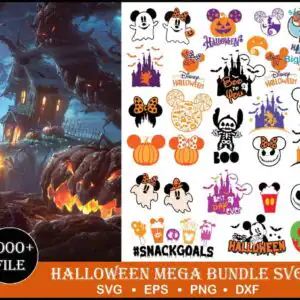
This Halloween SVG Images set is a Disney-style mega bundle of cut-ready artwork, and it comes as SVG, PNG, DXF, EPS and PDF files for vinyl, shirts, tumblers, mugs and sublimation. Across the preview sheet you will find Mickey Mouse head silhouettes, Minnie Mouse with her bow, ghosts, jack-o’-lanterns, Disney-style castles, bats and spider webs, set against a dark haunted-house scene in bold orange, black and purple. Jack Skellington-style faces, a poison apple and candy corn add a spooky touch, while lettering such as HALLOWEEN, Boo and Disney Halloween ties the artwork together. Green and dark navy accents round out the palette, so you can mix the characters on one project or cut them apart one at a time. The sheet is laid out as a collage, which makes it easy to pick out the pieces you want for a party, a costume shirt or a season of seasonal decor.
Design breakdown
The preview sheet shows 30 distinct designs in a portrait collage, on a white background. Among the designs shown in the preview are Mickey Mouse head silhouettes, Minnie Mouse with bow, Jack Skellington-style faces, a Stitch silhouette, and a lollipop and ice cream cone. The artwork uses six colours: black, white, Halloween orange, purple, green and dark navy. Fine details such as spider webs and bare spooky trees are best cut at 4 inches or larger. Each design is built for cutting in 3 layers, and the sheet includes a haunted-house scene on the left.
| Layers | 3 |
|---|---|
| Colours | 6 — black (#000000), white (#FFFFFF), Halloween orange (#F47B20), purple (#6A2C91), green (#8DC63F), dark navy (#1B2A4A) |
| Lettering | HALLOWEEN / Boo / Disney Halloween / #SNACKGOALS / Boo You / Lost Day Ever / 1000+ FILE / SVG / EPS / PNG / DXF |
| Background | white |
| Cut complexity | high |
| Orientation | portrait |
What’s included
- SVG
- PNG (300 dpi, transparent)
- DXF
- EPS
Works with
- Cricut Design Space
- Silhouette Studio (Designer Edition)
- Brother ScanNCut
- Adobe Illustrator
- Inkscape
- CorelDRAW
How to use
Download the zip file and unzip it to a folder on your computer. Open the SVG file in Cricut Design Space or Silhouette Studio (Designer Edition) by choosing Upload, then select the design you want. For printing on transfer paper or sublimation, use the PNG file at 300 dpi. Resize the artwork before cutting, and keep fine details like spider webs large enough to weed cleanly.
Licence
Personal and small-business commercial use. Sell finished physical items; do not resell or redistribute the files themselves.
FAQ
What files are included with this Halloween SVG Images set?
You get SVG, PNG, DXF, EPS and PDF files. The PNG files are 300 dpi with a transparent background, so they work for printing and sublimation. The SVG file is the one to open in a cutting program.
Can I use this Mickey and Minnie design on a 20oz tumbler?
Yes, the designs can be used on a 20oz tumbler using vinyl or a sublimation wrap. Size the artwork to fit your tumbler’s printable area before cutting or printing. Test one piece first to check the spacing and detail.
Which machines and software does this work with?
It works with Cricut Design Space, Silhouette Studio (Designer Edition), Brother ScanNCut, Adobe Illustrator, Inkscape and CorelDRAW. The DXF file suits programs that read that format, and the PNG file suits printing.
Can I sell items made with these files?
Yes, you can sell finished physical items made with them, under the personal and small-business commercial licence. You may not resell or redistribute the files themselves.


