

Finding Nemo Characters Birthday Shirt SVG for Cricut and Silhouette Kids Parties
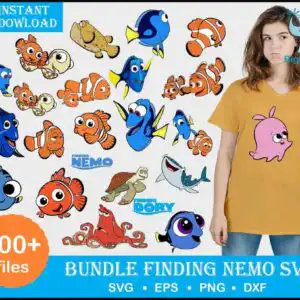
This Finding Nemo characters PNG and cut-file bundle is a preview sheet of many cartoon Finding Nemo figures, from Nemo and Dory to Marlin, Bruce, Hank and Crush, drawn in bold black outlines. You get SVG, PNG, DXF, EPS and PDF files, made for iron-on vinyl, t-shirts, stickers, mugs and cake toppers. Clownfish orange, royal blue and yellow dominate the artwork, with white accents and a light grey background on the preview. The sheet also shows the FINDING NEMO and FINDING DORY lettering, a pufferfish named Bloat in pink, and a model wearing a mustard T-shirt with a pink Bloat print. Use the files for a birthday party, an ocean-themed party, a kids craft afternoon or a handmade gift. Each figure is a separate design you can size and cut on its own.
Design breakdown
The preview sheet shows designs including Nemo and Marlin as clownfish, Dory as a blue tang, Bloat as a pufferfish, Crush the sea turtle, Bruce the shark, Hank the octopus, and Sheldon and Nigel among the designs shown in the preview. Artwork uses clownfish orange, royal blue, yellow, white, pink and a black outline, with a bright blue banner behind the title lettering. The files are cut in 3 layers, and the outlines are thin in places, so cut the smaller figures at 4 inches or larger. The sheet also includes a model wearing a mustard T-shirt with a pink Bloat print, and the FINDING NEMO and FINDING DORY logo text.
| Layers | 3 |
|---|---|
| Colours | 8 — clownfish orange (#F26B1D), royal blue (#1F4FB8), yellow (#FFD400), white (#FFFFFF), black outline (#111111), pink (#F2A7B8) |
| Lettering | INSTANT DOWLOAD / 200+ files / SVG • EPS • PNG • DXF / FINDING NEMO / FINDING DORY |
| Background | white |
| Cut complexity | high |
| Orientation | portrait |
What’s included
- SVG
- PNG (300 dpi, transparent)
- DXF
- EPS
Works with
- Cricut Design Space
- Silhouette Studio (Designer Edition)
- Brother ScanNCut
- Adobe Illustrator
- Inkscape
- CorelDRAW
How to use
Download the ZIP file and unzip it to a folder on your computer. Open Cricut Design Space, Silhouette Studio or Brother ScanNCut, then use Upload to import the SVG file you want. Resize the figure, check the cut lines, and mirror the design if you are cutting iron-on vinyl. For printing on paper or transfer sheets, open the PNG file, which has a transparent background.
Licence
Personal and small-business commercial use. Sell finished physical items; do not resell or redistribute the files themselves.
FAQ
What files are included in this Finding Nemo characters download?
You get SVG, PNG at 300 dpi with a transparent background, DXF, EPS and PDF files. The PNG files suit printing and sublimation, while the SVG and DXF files are for cutting machines.
Can I put a Finding Nemo design on a youth t-shirt with iron-on vinyl?
Yes, the designs work well for iron-on vinyl on youth or adult t-shirts. Cut the smaller figures at 4 inches or larger so the outlines stay clean, and mirror the file before cutting.
Does this work with Cricut and Silhouette machines?
Yes, the files work with Cricut Design Space, Silhouette Studio (Designer Edition) and Brother ScanNCut. They also open in Adobe Illustrator, Inkscape and CorelDRAW.
Can I use these designs for a small business that sells finished items?
Yes, the licence covers personal use and small-business commercial use when you sell finished physical items. You may not resell or redistribute the files themselves.


