Creepy Clown Head Halloween Shirt Design with Free Wifi in My Van Kids Lettering
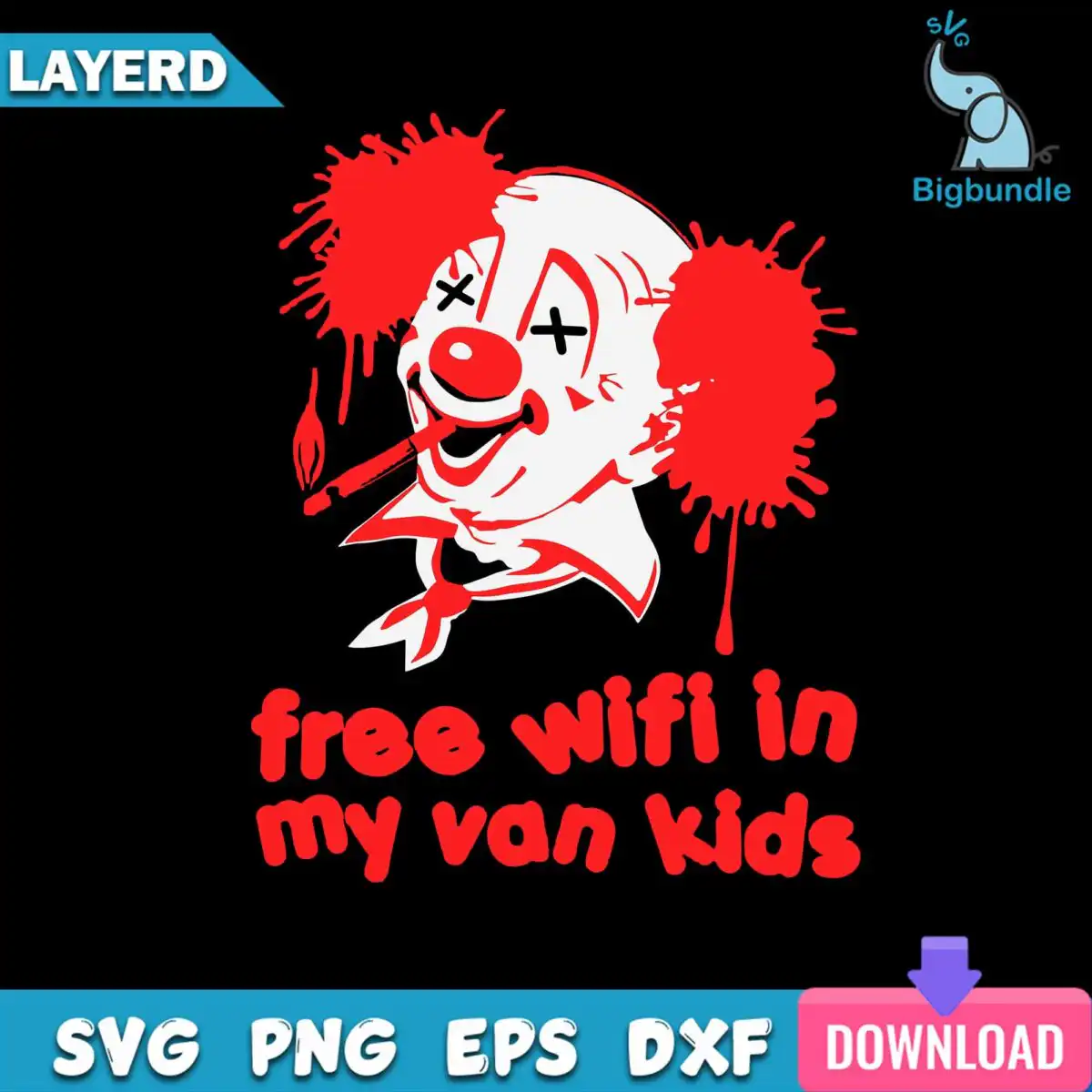
This wifi my van kids SVG is a single horror clown design, a creepy clown head with red splatter hair, X-marked eyes and a cigarette, above the lettering “free wifi in my van kids”. You get SVG, PNG, DXF, EPS and PDF files, made for shirts, hoodies, tumblers, vinyl decals and stickers. The artwork is built in black, red and white on a dark background, so it reads as a bold, grunge-style silhouette. A red clown nose, a ruffled collar and dripping red details add to the edgy, humorous mood. Its splatter texture gives the cut a distressed look that suits Halloween and everyday wear alike. Because the design is one layer of artwork in three colours, you can weed and press it without splitting the image into many pieces. It is a good pick if you want a joke that lands with horror fans, teens and adults.
Design breakdown
This is a single design cut in 3 layers, using black, red and white. The black layer forms the bold outline of the clown head, collar and lettering. The red layer holds the splatter hair puffs, the clown nose, the drips and the red details, and the white layer carries the X-marked eyes and highlight areas. The lettering “free wifi in my van kids” sits as a separate band above the phrase “LAYERD”, which is also included as text in the file. The cut is of medium complexity, so the splatter edges and eye shapes are best cut at 4 inches or larger on a standard vinyl cutter.
| Colours | 3 3 — black (#000000), red (#E31E24), white (#FFFFFF) |
|---|---|
| Lettering | free wifi in my van kids / LAYERD |
| Background | dark |
| Cut complexity | medium |
| Orientation | portrait |
What’s included
- SVG
- PNG (300 dpi, transparent)
- DXF
- EPS
Works with
- Cricut Design Space
- Silhouette Studio (Designer Edition)
- Brother ScanNCut
- Adobe Illustrator
- Inkscape
- CorelDRAW
How to use
Download the ZIP file from your order and unzip it to a folder on your computer. Open Cricut Design Space, Silhouette Studio or Brother ScanNCut, then use the Upload or Import option to bring in the SVG file. For shirts or tumblers, check the layers, set the colours to match your vinyl or transfer sheets, and resize the design before you cut. Use the PNG for sublimation or printing, and the DXF or EPS for other cutting software.
Licence
Personal and small-business commercial use. Sell finished physical items; do not resell or redistribute the files themselves.
FAQ
What files are included with this clown design?
You get SVG, PNG (300 dpi with a transparent background), DXF, EPS and PDF files. The SVG suits Cricut Design Space and Silhouette Studio, while the PNG works for printing and sublimation.
Can I use this clown head design on a 20oz tumbler?
Yes, the design works on a 20oz tumbler when you cut it as a vinyl decal or use the PNG for sublimation. Resize the artwork to fit your tumbler’s printable area before you cut or print.
Which machines and programs work with this file?
It works with Cricut Design Space, Silhouette Studio (Designer Edition), Brother ScanNCut, Adobe Illustrator, Inkscape and CorelDRAW. Any of these can open the SVG directly.
Can I resize the design and sell the finished items?
Yes, you can resize it freely for your project. The licence covers personal and small-business commercial use, so you can sell finished physical items, but you cannot resell or redistribute the files themselves.