



I Still Miss Patrice O’Neal Line Art Cartoon Scene for Shirts, Mugs and Decals
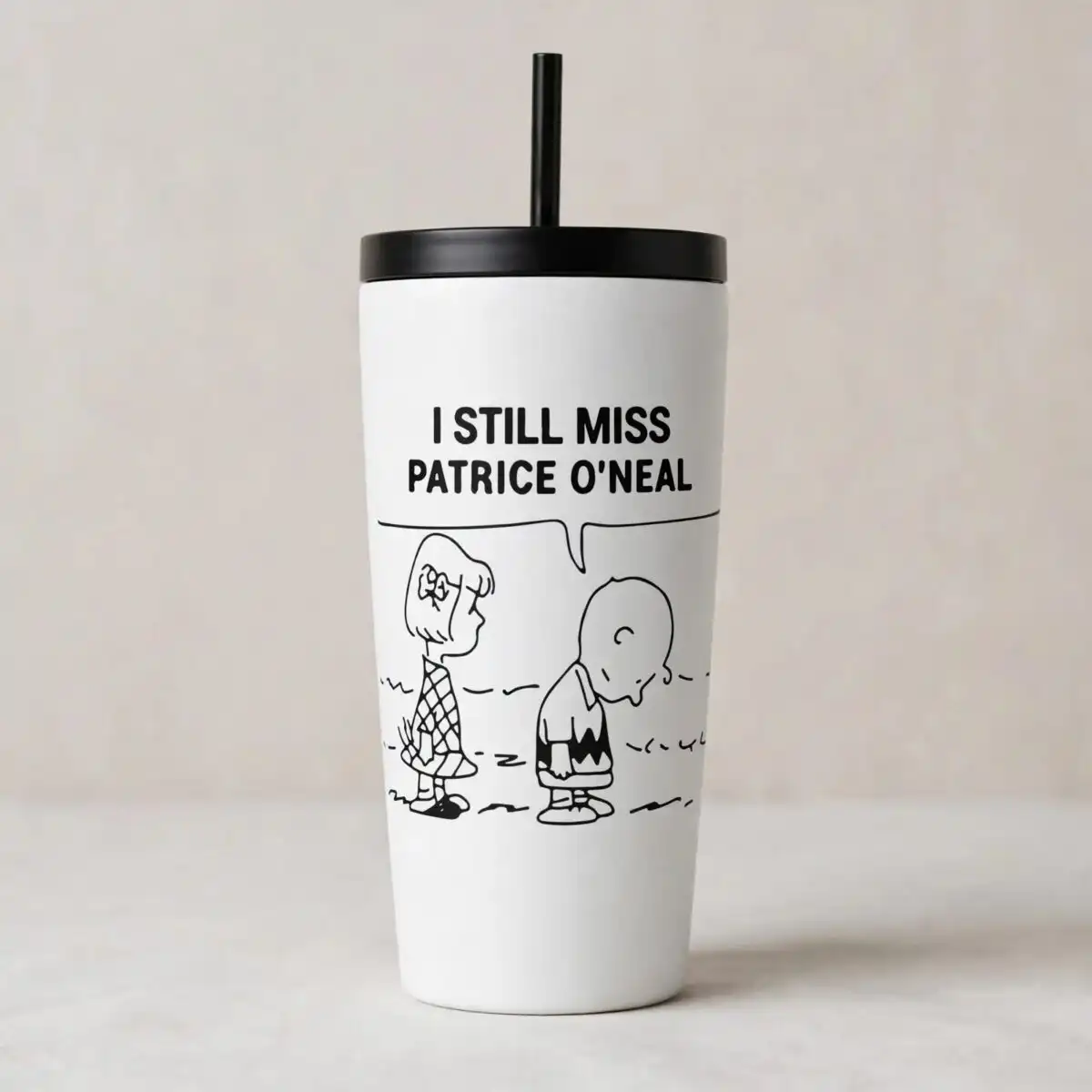
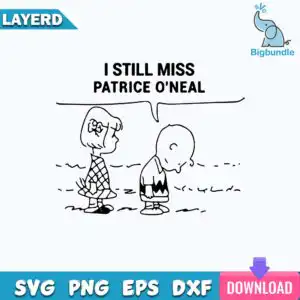
This still miss Patrice O’Neal SVG is a single black line-art cartoon scene, delivered as SVG, PNG, DXF, EPS and PDF files for cutting, printing and sublimation. The artwork shows two simple figures standing on a dashed ground line, with a speech bubble reading “I STILL MISS PATRICE O’NEAL” in black on a white background. One figure has bob hair, a bow and a diamond-patterned dress; the other is smaller, with a round head, a zigzag-striped shirt and its head bowed. Because the design is pure black outline on white, it suits vinyl decals, t-shirt prints, mug wraps and stickers without needing colour separation. The lettering is bold and easy to read, so the message stays clear once it is cut or printed. You can use the same file for personal projects or for finished items you sell in a small business. The scene is wistful and a little funny, and it works as a gift or a conversation starter for anyone who admired Patrice O’Neal.
Design breakdown
The design is a single black line-art layer on a white background, cut in 1 layer, with no colour separation needed. It includes a speech bubble with the lettering “I STILL MISS” and “PATRICE O’NEAL”, a standing figure with bob hair and a bow wearing a diamond-patterned dress, a smaller standing figure with a round head and zigzag-striped shirt, a dashed ground line, and scattered ground dashes. The outlines are drawn in a hand-drawn cartoon style, so the thinner strokes on the patterns and ground dashes need care when cutting. For vinyl, cut it at 4 inches or larger so the fine details remain intact.
| Layers | 1 |
|---|---|
| Colours | 6 — black (#000000), white (#FFFFFF), light blue (watermark/banner) (#3AB0D6), teal blue (LAYERD banner) (#1E9BC4), pink (download button) (#E0508F), purple (download arrow) (#7B5CD6) |
| Lettering | I STILL MISS / PATRICE O’NEAL |
| Background | white |
| Cut complexity | medium |
| Orientation | square |
What’s included
- SVG
- PNG (300 dpi, transparent)
- DXF
- EPS
Works with
- Cricut Design Space
- Silhouette Studio (Designer Edition)
- Brother ScanNCut
- Adobe Illustrator
- Inkscape
- CorelDRAW
How to use
Download the zip file from your order and unzip it to a folder on your computer. Open Cricut Design Space, Silhouette Studio or Adobe Illustrator, then use the Upload or Open command to import the SVG file. Check the size on the canvas, adjust it if needed, and send it to your cutter or printer. For shirts and mugs, the PNG version with a transparent background works well in print-on-demand or heat transfer software.
Licence
Personal and small-business commercial use. Sell finished physical items; do not resell or redistribute the files themselves.
FAQ
What files are included with this still miss Patrice O’Neal SVG?
You get SVG, PNG at 300 dpi with a transparent background, DXF, EPS and PDF files. The SVG is the one to use for cutting machines, while the PNG suits printing and sublimation.
Can I put this Patrice O’Neal design on a 20oz tumbler?
Yes, the design works on a 20oz tumbler when used as a vinyl decal or a sublimation wrap. Resize it to fit the tumbler’s printable area before cutting or printing, and keep the lettering at a readable size.
Which machines and programs does this file work with?
It works with Cricut Design Space, Silhouette Studio (Designer Edition), Brother ScanNCut, Adobe Illustrator, Inkscape and CorelDRAW. The PNG file can also be used with standard printers and heat transfer software.
Can I resize this file and use it in my small business?
Yes, you can resize it freely. The licence covers personal use and small-business commercial use for finished physical items, but you may not resell or redistribute the files themselves.


