Disneyland Donald Duck and Mickey Halloween Pumpkin PNG Design for Shirts and Mugs
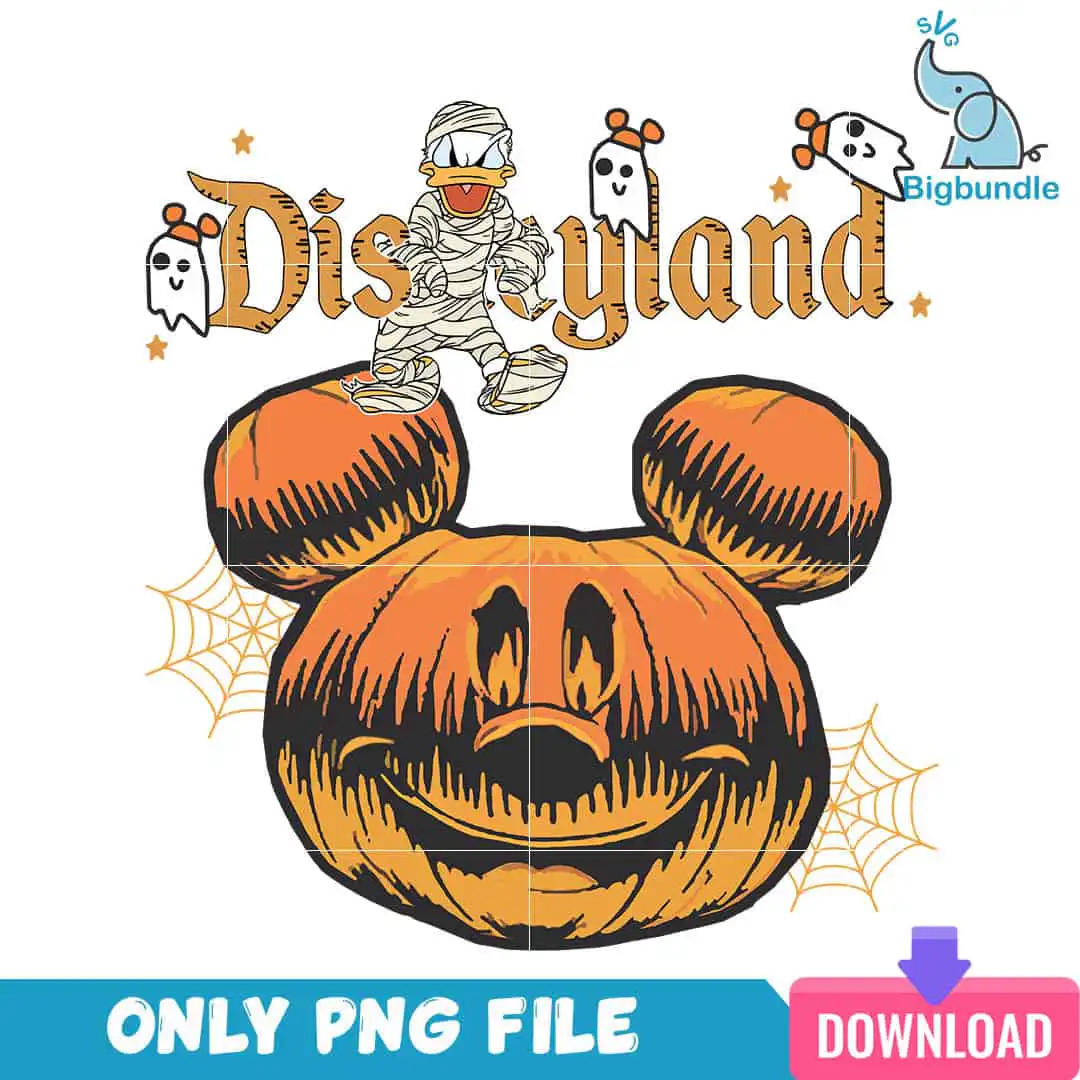
This Disneyland Donald Duck Mickey PNG is one hand-drawn Halloween design, delivered as a single PNG file with a transparent background, made for shirts, sweatshirts, tote bags, mugs and sublimation prints. The artwork centres on a jack-o’-lantern carved in the shape of a Mickey Mouse head, with gold-orange Disneyland lettering across the top. Beside it, a mummy-wrapped Donald Duck is wrapped in cream bandages, and three small ghosts, each with an orange Mickey-ear bow, float across the scene. Pumpkin orange, near-black outlines and cream give the piece a bold, vintage look. Spider webs and orange stars fill the corners. You get a ready-to-print image in one file, so you can place it on a light or dark garment and see the whole scene at once. Because the lettering and characters are outlined in near-black, the design reads clearly at most print sizes.
Design breakdown
The design is a single portrait-format image on a white background, with the Disneyland lettering in gold-orange above a Mickey Mouse-shaped jack-o’-lantern. It uses five colours: pumpkin orange for the pumpkin and stars, near-black for the outlines, cream for the mummy wrapping and ghosts, gold-orange for the lettering, and white as the background. The artwork includes a mummy-wrapped Donald Duck, three ghosts with orange Mickey-ear bows (left, centre and right), spider webs on the left and right, orange stars, and a small blue elephant logo with SVG Bigbundle branding. The file is designed to be cut in 8 layers, with a medium cutting complexity; fine details are best cut at 4 inches or larger. The linework has a hand-drawn, woodcut-like texture.
| Colours | 5 — pumpkin orange (#E8761E), near-black outline (#1A1414), cream/off-white (mummy wrapping, ghosts) (#F4EDE0), gold-orange lettering (#D9822B), white background (#FFFFFF) |
|---|---|
| Lettering | Disneyland |
| Background | white |
| Orientation | portrait |
What’s included
- PNG (300 dpi, transparent background)
Works with
- Sublimation printers (Epson, Sawgrass)
- DTF / print-and-cut workflows
- Canva
- Adobe Photoshop
How to use
Download the zip file and unzip it to a folder on your computer. Open your design software, such as Canva, Adobe Photoshop or your sublimation software, and import the PNG file. Resize it to fit your product, keeping the proportions locked so the Mickey-shaped pumpkin and characters stay true. Print on a sublimation printer or a DTF transfer set, then press or apply it to your finished item.
Licence
Personal and small-business commercial use. Sell finished physical items; do not resell or redistribute the files themselves.
FAQ
What files do I get with this Disneyland Donald Duck Mickey PNG?
You get one PNG file at 300 dpi with a transparent background. The image is a single design, not a bundle.
Can I use this Disneyland Halloween design on a 20oz tumbler or a mug?
Yes, the design works on mugs and tumblers when it is printed on sublimation paper and pressed onto a coated blank. Resize the PNG to the wrap area first so the Mickey-shaped pumpkin stays in proportion.
Which printers and software work with this PNG?
It works with sublimation printers such as Epson and Sawgrass, with DTF and print-and-cut workflows, and with Canva and Adobe Photoshop. Because the background is transparent, it prints without a white box around the artwork.
Can I resize the file and sell the items I make with it?
Yes, you can resize the file for personal and small-business commercial use. You may sell finished physical items, but you may not resell or redistribute the PNG file itself.