

Love It Valentine’s Day Shirt PNG with Black-Eared Characters and Candy Hearts
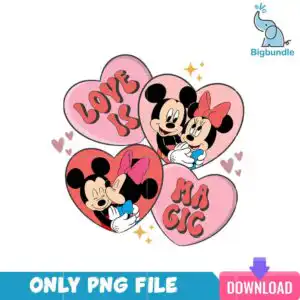
This Love It PNG is a single Valentine’s Day artwork of four cartoon hearts in a cluster, with two hearts showing an embracing pair of black-eared characters and two carrying lettering. You receive one PNG file at 300 dpi with a transparent background, made for sublimation printing, DTF transfers and cutting projects. The palette is light pink, coral red, white, black, gold and blue, with a pink bow, a red bow and a blue bow tie on the figures. Small gold four-point sparkles and tiny pink hearts surround the cluster, giving it a playful, romantic feel. The words LOVE IT, MAGIC and DOWNLOAD appear in retro lettering across the hearts. Because the background is transparent, the design drops straight onto light or dark fabric, mugs and tote bags without a box around it. It works well as a shirt design for couples, friends or a classroom Valentine’s exchange.
Design breakdown
The artwork is a square, flat vector design built from four heart shapes: a light pink heart top left, a light pink heart with figures top right, a coral red heart with figures bottom left, and a light pink heart with lettering bottom right. The figures are cartoon black-eared characters shown in an embracing pose, with white gloved hands, a pink bow, a red bow and a blue bow tie or collar. The lettering reads LOVE IT, MAGIC, ONLY PNG FILE, DOWNLOAD and SVG. Gold four-point sparkle stars and small pink hearts are scattered around the cluster. The file uses six colours: light pink, coral red, white, black, gold and blue. It is cut in 12 layers and has high cutting complexity, so fine details such as the sparkles and bow edges are best cut at 4 inches or larger.
| Colours | 6 — light pink (#F4A7B9), coral red (#E8475A), white (#FFFFFF), black (#1A1A1A), gold (#F2B134), blue (#3A9AD9) |
|---|---|
| Lettering | LOVE IT / MAGIC / ONLY PNG FILE / DOWNLOAD / SVG |
| Background | white |
| Orientation | square |
What’s included
- PNG (300 dpi, transparent background)
Works with
- Sublimation printers (Epson, Sawgrass)
- DTF / print-and-cut workflows
- Canva
- Adobe Photoshop
How to use
Download the ZIP from your order page and unzip it to a folder on your computer. Open your design software, such as Canva or Adobe Photoshop, and choose File, then Import or Open to place the PNG. Resize the artwork by its corners so the sparkles and lettering stay sharp, then print it on sublimation paper or prepare it for your DTF or cutting workflow. Check the transparent background in the preview before you print.
Licence
Personal and small-business commercial use. Sell finished physical items; do not resell or redistribute the files themselves.
FAQ
What files are included with this Love It PNG design?
You receive one PNG file at 300 dpi with a transparent background. It is a single design, not a bundle, so there are no extra files in the download.
Can I put this Valentine’s design on a 20oz tumbler?
Yes, the square artwork can be placed on a 20oz tumbler wrap in sublimation. Resize it so the hearts and lettering fill the area you want, and keep the sparkles large enough to print cleanly.
Which printers and programs work with this PNG?
It works with Sublimation printers such as Epson and Sawgrass, DTF and print-and-cut workflows, Canva and Adobe Photoshop. The transparent background means you can layer it over any colour.
Can I resize the design and sell the shirts I make with it?
Yes, you can resize the file for your project. The licence covers personal and small-business commercial use, so you may sell finished physical items, but you may not resell or redistribute the PNG file itself.